Skip to content
eMDTeceMDTec
  • Home
  • About Us
    • Blog
  • Services
    Manage
    Managed IT
    Co-Managed IT
    eMDs Solution Series
    Help Desk Services
    IT Consulting
    Healthcare IT
    Secure
    Backup & Disaster Recovery
    Cybersecurity
    Cybersecurity Assessment
    Cybersecurity For a Remote Workforce
    Network Security
    Collaboration
    Communication
    Hybrid IT: Remote Workforce Solutions
    Cloud Services
    AI Productivity Solutions
    Microsoft 365 Copilot
  • Compliance
    • HIPAA/HITECH
    • EMR/EHR
    • Security and Risk Assessments
    • IT Risk Assessment and Security Posture Review
    • WISP Compliance 
    • Banking & Insurance Regulation 22–05 Compliance
  • Contact
  • FAQ
  • Talk With Sales
  • Client Support

Category Archives: Working from Home

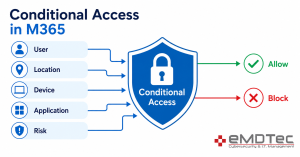
Diagram showing how conditional access in Microsoft 365 evaluates user, location, device, application, and risk signals to allow or block sign-ins.
Conditional Access in M365: What It Actually Does (And Why Your Business Needs It)

07
May
Free cyber security digital cyber illustration
“Clean Desk” 2.0: Securing Your Home Office from Physical Data Leaks

In the traditional office, a “Clean Desk” policy was a simple habit: shred the sensitive [...]

05
May
Free list notes icon illustration
The Essential Checklist for Securing Company Laptops at Home

At home, security incidents don’t look like dramatic movie hacks. They look like stepping away [...]

30
Apr
Are consumer VPNs safe for work — illustration showing a personal VPN connection triggering a security alert on a Microsoft 365 sign-in event
Are Consumer VPNs Safe for Work? What SMB Owners Need to Know Before Employees Connect to M365

It’s 11:47 PM on a Tuesday. Your IT provider gets a security alert: one of [...]

30
Apr
a computer keyboard with a padlock on top of it
Remote Work Security Revisited: Advanced Strategies for Protecting Your Business in 2025

The landscape of remote work has transformed dramatically over the past several years. What began [...]

25
Jul
Recent Posts
  • BYOD Policy for Small Business: Should You Let Employees Use Personal Phones?
  • The “Backup Exit” Strategy: Can You Move Your Data Without the Vendor’s Help?
  • Security Defaults vs. Conditional Access: Which M365 Security Option Is Right for Your Business?
  • Micro-SaaS Vetting: The 5-Minute Security Check for Browser Add-ons
  • What Is Microsoft Intune? A Plain-English Guide for Small Business Owners
Recent Comments
    emdtec-logo-light
    HIPAA Seal of Compliance” width=

    eMDTec was born to assist medical offices with their increasing demand for technology services and compliance mandates in running their offices more efficiently, reducing risk, and serving patients more effectively.

    We take care of your technology!

    Services

    Backup & Disaster Recovery
    Co-Managed IT
    Communications
    Cybersecurity
    Cybersecurity Assessment
    eMDs Solution Series
    Help Desk Services
    Hybrid IT Remote Workforce
    IT Consulting
    Managed IT

    Areas We Serve

    Clifton
    Jersey City
    Montclair
    Union
    Verona

    Get in Touch

    155 Pompton Ave
    STE 107
    Verona, NJ 07044-2935

    Phone: (973) 295-5570

    Support: (973) 295-9500

    Support SMS: (973) 295-9500

    Fax: (973) 295-9529

    Copyright 2026 © eMDTec. Powered by eMDTec | Privacy Policy.
    • Home
    • About Us
      • Blog
    • Services
      • Backup & Disaster Recovery
      • Co-Managed IT
      • Cybersecurity 
      • Cybersecurity Risk Assessment
      • Cybersecurity For a Remote Workforce
      • eMDs Solution Series
      • Help Desk Services
      • Healthcare IT Services
      • Hybrid IT: Remote Workforce Solutions
      • IaaS
      • IT Consulting
      • Managed IT
      • Communications
      • Microsoft 365 Copilot
      • AI Productivity Solutions
    • Compliance
      • HIPAA/HITECH
      • EMR/EHR
      • Security and Risk Assessments
      • IT Risk Assessment and Security Posture Review
      • WISP Compliance 
      • Banking & Insurance Regulation 22–05 Compliance
    • Contact
    • FAQ