

 Managed IT Services
When this article was first published in 2022, multi-factor authentication was still something many New Jersey business owners thought of as optional, a feature for banks and large corporations. That is no longer the case. MFA for small business accounts, meaning multi-factor authentication for small business email, remote access, and cloud systems, is now required by cyber insurance carriers, expected by regulators under HIPAA and the FTC Safeguards Rule, and assumed by every client security questionnaire you will receive. More importantly, it remains the single most effective, least expensive control against the attack that hits small businesses most often: a stolen password.
This updated guide to MFA for small business explains what multi-factor authentication (MFA) is, which types actually protect you in 2026, why insurers and regulators insist on it, where to turn it on first, and how to roll it out to a team that is busy seeing patients, closing deals, or filing returns. If you are looking for the step-by-step configuration details, our companion post, a small business guide to implementing MFA, picks up where this one leaves off.
What Is Multi-Factor Authentication?
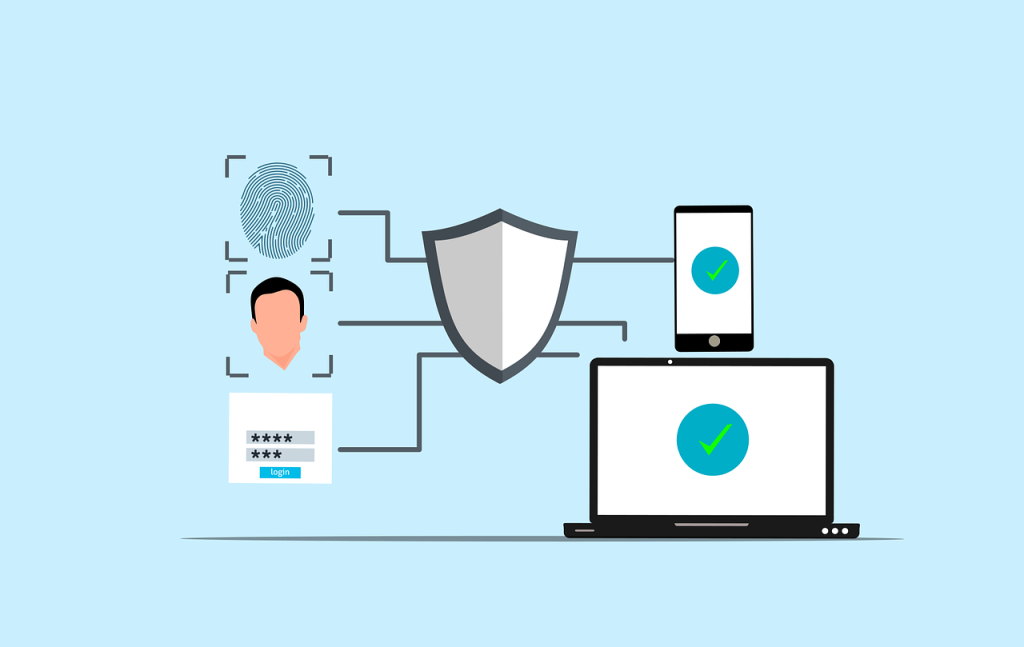
Multi-factor authentication is a sign-in method that requires more than one proof of identity. The proofs come from different categories: something you know (a password or PIN), something you have (a phone, a hardware key, a smart card), and something you are (a fingerprint or face scan). A password plus a code from an authenticator app is multi-factor authentication for small business purposes. A password plus a security question is not, because both are things you know.
The reason MFA for small business matters so much is simple. Passwords get stolen constantly, through phishing, data breaches at other companies, malware, and plain guessing. When MFA is in place, a stolen password alone is not enough to log in. Microsoft has reported that enforcing MFA blocks the overwhelming majority of automated account-compromise attempts, and that finding has held up across years of real-world data. For a business without a security team, there is no other control that delivers that much protection for that little money.
Why MFA for Small Business Is No Longer Optional
Small and mid-sized businesses are attractive targets precisely because attackers expect weaker defenses and faster payouts. A compromised email account at a 20-person law firm can redirect a six-figure real estate closing. A compromised login at a medical practice exposes every patient record the user could see. Four forces have turned MFA for small business from a recommendation into a requirement.
1. Stolen credentials are the number one way in
Year after year, industry breach reports show that stolen or weak credentials are among the most common initial access methods, ahead of software vulnerabilities. Attackers do not need to break in when they can log in. Our article on credential theft protection explains how those passwords are stolen in the first place; MFA is the control that makes the theft far less useful.
2. Cyber insurance carriers require it
MFA for cyber insurance eligibility is now standard, and carriers ask about MFA for small business applicants as pointedly as they ask large ones. Nearly every carrier’s application asks whether MFA is enforced on email, remote access, and privileged accounts, and many decline to quote, add exclusions, or raise premiums when the answer is no. Worse, a claim can be denied if the application said MFA was in place and the breach investigation shows it was not. Our cyber insurance coverage guide covers the other controls carriers now expect.
3. Regulators expect it
The FTC Safeguards Rule explicitly requires multi-factor authentication for anyone accessing customer information at CPA firms, tax preparers, mortgage brokers, and other covered businesses. PCI DSS version 4 requires MFA for all access into the cardholder data environment. The proposed HIPAA Security Rule update would make MFA mandatory for systems holding electronic protected health information, and investigators already treat its absence as a red flag. New Jersey’s own privacy and breach-notification laws raise the cost of getting this wrong. See our breakdown of which NJ regulations apply to your business.
4. Your clients and partners ask about it
Hospital systems, corporate legal departments, and financial institutions send security questionnaires to the vendors and professional firms they work with. “Is MFA enforced for all users?” is on every one of them. A no can cost you the engagement.
Types of Multi-Factor Authentication, Ranked by Strength
Not every form of MFA for small business use offers the same protection, and the gap has widened as attackers adapted. Here are the common types of multi-factor authentication a small business will encounter, from weakest to strongest. Knowing the types of multi-factor authentication available helps you choose the right one for each role.
| MFA Method | How It Works | Strength in 2026 |
|---|---|---|
| SMS or voice codes | A one-time code is texted or read to your phone | Better than nothing; vulnerable to SIM swapping and real-time phishing |
| Email codes | A code is emailed to you | Weak if the email account itself is the target |
| Authenticator app (TOTP) | An app generates a rotating six-digit code | Good; still phishable by proxy kits |
| Push notification with number matching | You approve a prompt and type the number shown on screen | Good; number matching defeats “MFA fatigue” spam |
| Hardware security key (FIDO2) | A USB or NFC key you tap to sign in | Phishing-resistant; strongest for admins and finance |
| Passkeys and Windows Hello for Business | Biometric or PIN unlock tied cryptographically to the real site | Phishing-resistant; best user experience |
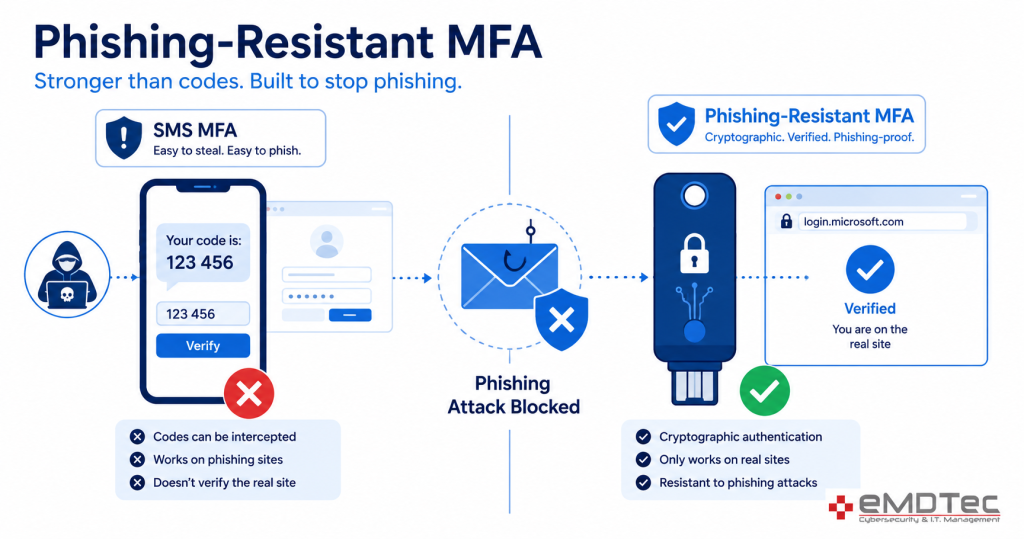
The practical advice on MFA for small business in 2026: use an authenticator app with number matching as the baseline for everyone, move administrators, owners, and finance staff to hardware keys or passkeys, and stop relying on SMS wherever a stronger option exists. Our posts on phishing-resistant MFA versus SMS codes and passkeys for business go deeper on the strongest options.
Where to Turn On MFA First
If you are starting from zero with multi-factor authentication for small business systems, do not try to protect everything on day one. MFA for Small Business should be rolled out in order of risk:
- Administrator accounts for Microsoft 365, Google Workspace, your firewall, your website, and your line-of-business software. These are the keys to everything else.
- Email for every user. Email is where password resets land, where wire instructions are sent, and where attackers hide. Microsoft 365 MFA setup through Conditional Access or Security Defaults should cover every mailbox, including shared ones.
- Remote access. VPN, remote desktop gateways, and any remote-support tools. Unprotected remote access is a leading entry point for ransomware.
- Financial systems. Online banking, payroll, accounting software, and payment processors.
- Cloud applications holding client or patient data. EHR and practice management, case management, document portals, CRM, and file sharing.
- Everything else, ideally through single sign-on so users authenticate strongly once and the rest follows.
For Microsoft 365 customers, the decision between Security Defaults and Conditional Access determines how much control you have over enforcement. Our comparison of Security Defaults versus Conditional Access explains which fits a small business.
MFA for Cyber Insurance: What Carriers Actually Check
Because so many claims trace back to a single compromised login, and because MFA for small business policies is so inexpensive, insurers have become specific about MFA for cyber insurance applications. Expect questions about MFA for cyber insurance along these lines, and expect the answers to be verified during a claim:
- Is MFA enforced for all users on email, including web access and mobile devices?
- Is MFA required for all remote network access, including VPN and remote desktop?
- Is MFA required for all administrative and privileged accounts, both cloud and on-premises?
- Is MFA required for access to backups and backup management consoles?
- Are legacy authentication protocols that bypass MFA disabled?
“Enabled” and “enforced” are not the same thing when it comes to MFA for small business tenants. Many businesses turned MFA on in 2021 but left it optional, left service accounts and shared mailboxes exempt, or never disabled legacy protocols. A quick tenant review before your renewal avoids an uncomfortable discovery after a breach. The CISA guidance on MFA is a useful plain-language reference to share with your broker.
How to Train Employees on Multi-Factor Authentication
Technology enforces MFA for small business accounts; people make it work. Most MFA failures we see are human: an employee approves a push notification they did not initiate because they assume it is a glitch, or someone reads a code to a “help desk” caller. Effective training for multi-factor authentication for small business teams covers:
- Why it exists, in terms that matter to them: protecting patients, clients, and their own paychecks.
- Never approve a prompt you did not trigger. An unexpected MFA request means someone has your password. Report it immediately.
- Never share a code with anyone, including IT. Legitimate support will never ask for it.
- Register two methods, such as the authenticator app plus a hardware key or a backup phone, so a lost device does not become a lockout.
- What to do when a phone is lost or replaced, and who to call.
Pair the MFA for small business rollout with a short live session, a one-page guide, and a help line for the first two weeks. Adoption goes smoothly when people know what to expect and whom to ask.

Common Objections, Answered
“It will slow my staff down.”
With modern MFA for small business setups, users on a trusted, managed device typically authenticate once a day or less, and passkeys are faster than typing a password. The real slowdown is a week of downtime after a breach.
“Our staff don’t want work apps on personal phones.”
Hardware security keys cost little and require no phone, which keeps multi-factor authentication for small business staff who refuse work apps on personal devices simple. Desk-based staff can also use Windows Hello for Business on their workstation.
“We’re too small to be a target.”
Credential-stuffing attacks are automated and indiscriminate, which is exactly why MFA for small business accounts matters. Attackers test leaked passwords against every Microsoft 365 tenant they can find, and a five-person firm with no MFA is an easier win than a 500-person company with it.
MFA for Small Business by Industry
The core approach is the same everywhere, but the systems that need protecting and the rules behind them differ. Here is how MFA for small business looks in the industries eMDTec serves most across Essex, Morris, Passaic, and Bergen counties.
Medical and dental practices
The EHR and practice management system, the patient portal administration, e-prescribing, email, and any cloud fax or billing service all need MFA. E-prescribing of controlled substances already requires two-factor authentication under DEA rules, so most prescribers are familiar with the process. Shared workstation logins in exam rooms are the common gap; badge taps or Windows Hello for Business solve it without slowing clinicians down. Our HIPAA compliance consulting team includes MFA coverage in every security risk analysis.
Law firms
For a law firm, multi-factor authentication for small business email is the crown jewel, because business email compromise against real estate and litigation practices is where the largest losses happen. Case management, document management, e-filing accounts, and trust accounting all follow. Partners who resist MFA on their phones are usually happy with a hardware key on their keychain. See our IT support for law firms page.
Accounting, tax, and financial advisory firms
The FTC Safeguards Rule makes MFA for small business accounting firms a legal requirement, and the IRS Written Information Security Plan expectations for tax professionals point the same way. Tax software, client portals, payroll platforms, custodian and broker-dealer systems, and email all need it, and seasonal staff need to be onboarded with MFA from day one. Details are on our FTC Safeguards Rule compliance page.
Professional services and everyone else
Even without a specific regulator, your cyber insurance policy and your clients’ contracts set the bar. Email, remote access, banking, and your CRM or project system are the minimum.
What MFA for Small Business Costs
For most offices, the software cost of MFA is zero, because it is already included in Microsoft 365, Google Workspace, and the majority of business applications. The real costs are modest and one-time:
- Hardware security keys for administrators, owners, and finance staff, typically a few dozen dollars each, with a spare per person.
- Configuration time to set up Conditional Access policies, disable legacy protocols, register users, and document the setup for your insurer and auditor.
- Training time, usually a 30-minute session plus a short guide.
- Ongoing support for lost phones, new hires, and departures, which a managed IT provider handles as part of normal service.
Compare that to the cost of a single business email compromise, which for a small firm routinely runs into tens of thousands of dollars before counting legal fees, notification costs, and lost clients. Multi-factor authentication for small business owners is one of the few security purchases that is cheaper than doing nothing.
MFA Mistakes We See in New Jersey Offices
When we take over IT for a business that “already has MFA for small business accounts,” these are the gaps we find most often during the first review:
- MFA enabled per user but never enforced, so new hires and some long-time staff were never prompted.
- Legacy authentication protocols such as IMAP, POP, and basic SMTP left on, allowing older apps and attackers to bypass MFA entirely.
- Shared mailboxes, service accounts, and the “scanner” account exempted and forgotten.
- Administrators using the same account for email and global admin, so one phished login carries the whole tenant.
- Only one MFA method registered, which turns a lost phone into a locked-out employee and a support emergency.
- SMS still used for executives and finance, the accounts attackers target most.
- Remote desktop or VPN reachable from the internet with a password alone.
- No documentation, so nobody can prove to the insurer or auditor what was enforced and when.
Each of these MFA for small business gaps is quick to fix once found. The point is to look, and to look again after staff changes and software migrations.
MFA for Small Business: Frequently Asked Questions
Does Microsoft 365 include MFA?
Yes. Microsoft 365 MFA setup is included in every business plan through Security Defaults, and Business Premium adds Conditional Access for granular enforcement. The cost barrier is zero; the work is in configuration and rollout.
Is SMS MFA still acceptable?
For MFA for small business use it is better than a password alone, but it is the weakest option and some insurers and frameworks no longer accept it for privileged accounts. Use an authenticator app or a phishing-resistant method wherever possible.
What is MFA fatigue?
An attack in which a criminal with a stolen password triggers repeated push notifications until the user approves one to make them stop. Number matching, which requires the user to type a code shown on the login screen, defeats it.
How long does an MFA rollout take?
For a business of 10 to 50 people, Microsoft 365 MFA setup for administrators and email can be protected in a day, and a full rollout including remote access, financial systems, and training typically takes two to four weeks.
Does MFA satisfy HIPAA or the FTC Safeguards Rule by itself?
No. MFA for Small Business compliance is one required control among several, alongside encryption, access reviews, logging, training, and a written security program, but it is the one examiners and insurers check first.
Get Multi-Factor Authentication Enforced the Right Way
MFA for Small Business owners is the fastest, most affordable security improvement a New Jersey small business can make, and in 2026 it is also the one your insurer, your regulator, and your clients expect to see. eMDTec has helped medical practices, law firms, accounting firms, and professional services businesses across NJ plan, enforce, and train on multi-factor authentication since the days when it was still optional, as part of our cybersecurity services and managed IT services. Schedule a free consultation and we will review your current MFA for small business coverage against what your insurance application and compliance obligations require.