

 Managed IT Services

Security Defaults vs Conditional Access is the decision every Microsoft 365 admin eventually faces. If you have been managing a Microsoft 365 tenant, you have probably run into the question: should we enable Security Defaults or build out Conditional Access policies? It sounds like a feature decision. It is actually a licensing decision, and the answer reveals whether your organization is set up for real, scalable protection or just minimum viable security.
This post breaks down what each option does, what separates them at the licensing level, why we recommend Microsoft 365 Business Premium as the minimum license for any business serious about protecting its users and data, and, new in this update, the specific Conditional Access policies to build first and how to move from one to the other without locking anyone out.
What Security Defaults Actually Do
Security Defaults are Microsoft’s free, one-switch security baseline, the free side of the Security Defaults vs Conditional Access equation. When enabled, they enforce a consistent set of protections across your entire tenant with zero configuration required:
- MFA for all users: every account must register for and use multi-factor authentication via the Microsoft Authenticator app.
- MFA required for administrators: privileged accounts face stricter sign-in requirements on every login.
- Legacy authentication blocked: older protocols like IMAP, SMTP AUTH, and POP3 are cut off, eliminating one of the most common credential attack vectors.
Security Defaults are available on every Microsoft 365 plan at no additional cost, and Microsoft now enables them by default on new tenants. For a brand-new organization with no IT staff and no security budget, they provide an immediate, meaningful baseline.
The catch is significant, though: Security Defaults are all-or-nothing. Every policy applies to every user, with no exceptions, no exclusions, and no way to tailor the experience for different roles, locations, or devices. For any business with more than a handful of employees, that rigidity creates friction, and security gaps, fast.

What Conditional Access Adds
Conditional Access is Microsoft’s policy-driven answer to the limitations of Security Defaults, making up the other half of the Security Defaults vs Conditional Access equation. Instead of blanket rules for every user, you define conditions, and the policy only fires when those conditions are met. That means you can:
- Require MFA only when a user signs in from an unrecognized location or an unmanaged device.
- Block access entirely from high-risk geographies or flagged IP ranges.
- Apply stricter controls to administrator accounts while keeping the sign-in experience smooth for standard users.
- Enforce device compliance via Intune before granting access to sensitive apps.
- Use risk-based sign-in policies that automatically challenge or block suspicious sessions in real time.
The result is a security framework that scales with your organization: more control, less friction, and the ability to align your policies to how your team actually works. We have covered the mechanics in detail in Conditional Access in M365: What It Actually Does. The short version: it is the identity security tool that transforms Microsoft 365 into a genuine Zero Trust platform.
The Licensing Difference, and Why It Matters
This is the core of the Security Defaults vs Conditional Access debate, and it clarifies quickly:
- Security Defaults: free, included in every Microsoft 365 plan.
- Conditional Access: requires Microsoft Entra ID P1 or higher.
Entra ID P1 is not included in Microsoft 365 Business Basic (around $6 per user per month) or Business Standard (around $12.50). It is included in Microsoft 365 Business Premium (around $22). So when you weigh Security Defaults vs Conditional Access, the real question is not “which security feature do I want?” It is “what plan should my entire organization be on?” And once you look at everything Business Premium includes, the answer gets clear fast.
Why Microsoft 365 Business Premium Should Be Your Minimum License
Microsoft 365 Business Premium is often dismissed as an expensive upgrade, but it settles Security Defaults vs Conditional Access by including Entra ID P1. When you look at what is actually bundled in, it is one of the strongest per-user values in the market, especially for small and mid-sized businesses that would otherwise pay for these tools separately. Beyond the standard Office apps and Exchange, you get:
- Microsoft Entra ID P1: unlocks Conditional Access, self-service password reset, and advanced identity governance.
- Microsoft Defender for Business: enterprise-grade endpoint detection and response purpose-built for SMBs, covering every managed device.
- Microsoft Intune: full mobile device management and compliance enforcement, which feeds directly into Conditional Access policy decisions.
- Defender for Office 365 Plan 1: anti-phishing protection, safe links, and safe attachment scanning across email and Teams.
- Azure Information Protection Plan 1: data classification and sensitivity labeling to protect your most critical files wherever they travel.
When you price out even two or three of these tools separately, particularly Defender for Business and Intune, Business Premium frequently costs less than assembling an equivalent stack from separate vendors. More importantly, these tools are designed to work together. Intune establishes device compliance. Conditional Access enforces it at every sign-in. Defender for Business monitors endpoints around the clock. Defender for Office 365 protects the inbox. It is an integrated security architecture, not a collection of disconnected products, and it is exactly the kind of layered defense described in 5 Security Layers Your MSP Is Likely Missing.
Business Premium also serves as the practical foundation for a Zero Trust security model for small business, where verified identity and device compliance are the gatekeepers to every resource, not just the perimeter.

So When Do Security Defaults Make Sense?
In the Security Defaults vs Conditional Access decision, there are legitimate scenarios where Security Defaults are the right choice, at least temporarily:
- Brand-new tenants with no IT support: they provide an immediate baseline with zero configuration.
- A transitional step while your organization evaluates or budgets for a move to Business Premium.
- Very small organizations with no compliance requirements, where the all-or-nothing approach does not create meaningful friction.
What Security Defaults are not is a long-term strategy. If your business handles client data, operates under any compliance framework, or has employees with different roles and access needs, the inflexibility will create real problems, in security gaps, in user experience, or both. Treating Security Defaults as a permanent solution instead of a starting point is one of the most common cybersecurity mistakes small companies make.
One important operational note: Security Defaults and Conditional Access are not designed to run simultaneously. Once you build out Conditional Access policies, Security Defaults should be disabled. They serve overlapping functions and can conflict in ways that are difficult to troubleshoot.
The First 6 Conditional Access Policies to Build
Once you are on Business Premium, the Security Defaults vs Conditional Access question becomes “which policies first?” These six Conditional Access policies reproduce everything Security Defaults did and then add the controls it could not. Build each in report-only mode, review the sign-in log for a few days, then switch to enforce.
- Require MFA for all users. All cloud apps, all users, with a break-glass administrator account excluded and stored securely offline.
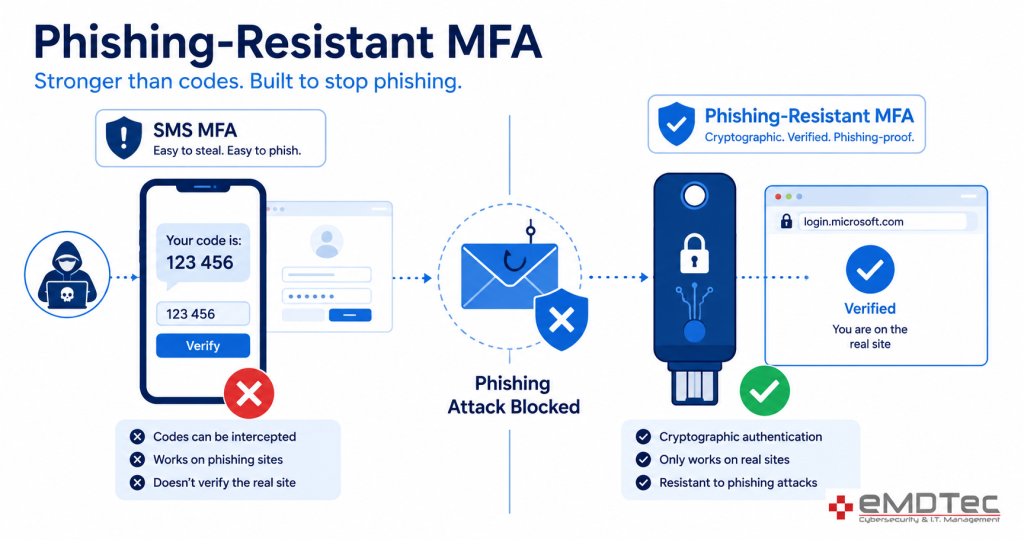
- Require phishing-resistant MFA for administrators. Hardware keys or passkeys for every privileged role, not just the authenticator app.
- Block legacy authentication. Target the legacy client app types and block, so IMAP, POP, and basic SMTP can no longer bypass MFA.
- Require a compliant device for Office 365 and sensitive apps. Tied to Intune compliance policies, so unmanaged personal computers cannot open client or patient data.
- Block sign-ins from countries where you do not operate. A named location policy for the United States (and anywhere staff legitimately travel), with a documented exception process.
- Require MFA and limit session for risky sign-ins. Using sign-in risk and user risk signals where your license supports them, so unusual activity is challenged automatically.
From there, common additions are a policy requiring approved apps on mobile devices, a shorter sign-in frequency for shared workstations such as clinical rooms, and a policy restricting guest accounts. Microsoft’s own Conditional Access templates cover most of these and are a sensible starting point; the CISA SCuBA baselines for Microsoft 365 are a good independent check.
Migrating From Security Defaults to Conditional Access Without Lockouts
The migration itself, the practical side of Security Defaults vs Conditional Access, is where businesses get nervous, and with reason: a bad policy can lock every user out, including the admin. The safe sequence is:
- Confirm every user has Business Premium (or an Entra ID P1 license) assigned, and that Intune enrollment is complete for managed devices.
- Create two break-glass global administrator accounts, excluded from all Conditional Access policies, with long random passwords stored offline and alerts on any sign-in.
- Build the six policies above in report-only mode while Security Defaults are still on.
- Review the sign-in logs and the Conditional Access insights workbook for a week. Fix any user, app, or device that would have been blocked.
- Switch the policies to enforce one at a time, starting with MFA for all users, and leave a day between each.
- Disable Security Defaults only after the MFA and legacy authentication policies are enforced and verified.
- Document the policies, the exclusions, and the break-glass procedure, and schedule a quarterly review.
What Changes Day to Day After the Switch
Owners sometimes assume the Security Defaults vs Conditional Access change will be invisible to staff. In practice it is noticeable, and mostly in a good way. On the office network, on a compliant company laptop, most users stop seeing MFA prompts every day; the policy recognizes the trusted device and known location and asks less often. At home or on a phone, prompts continue, because that is where the risk is.
Administrators notice the most: a separate admin account, a hardware key or passkey, and a prompt on every privileged action. The help desk sees a short rise in tickets during the first two weeks, mostly from staff on unenrolled personal devices discovering they can no longer open company files, which is the policy working as intended.
After a month, the ticket volume drops below where it started, because the legacy-authentication and MFA-fatigue problems that used to generate support calls are gone. The sign-in logs become the first place a managed IT provider looks each morning, and the Conditional Access policies become the evidence you hand to an auditor or insurer.
Security Defaults vs Conditional Access for Regulated New Jersey Businesses
For the industries eMDTec serves, the Security Defaults vs Conditional Access decision is usually made by the regulator before the business gets to it. HIPAA’s proposed Security Rule update would make MFA mandatory and expects access controls that distinguish between roles and devices; Security Defaults cannot distinguish anything. The FTC Safeguards Rule requires MFA for anyone accessing customer information and periodic access reviews, which Conditional Access reporting supports directly.
Cyber insurance applications now ask whether MFA is enforced for all users, remote access, and administrators, and whether legacy authentication is disabled; Conditional Access lets you answer each with a policy name rather than a hope. See our HIPAA compliance consulting and FTC Safeguards Rule compliance services for how we document this.
Making the Call: A Simple Decision Framework
If you are trying to decide where your organization stands on Security Defaults vs Conditional Access today, here is a quick way to think it through:
| Your Situation | Recommended Approach |
|---|---|
| New tenant, no IT staff, Basic license | Enable Security Defaults now; plan the move to Business Premium |
| Growing business on Business Standard | Upgrade to Business Premium; you are one step away from a full security stack |
| Any compliance requirement (HIPAA, PCI, SOC 2, FTC Safeguards) | Business Premium minimum; evaluate E3/E5 depending on scope |
| Remote or hybrid workforce | Business Premium; device compliance and location-based policies are essential |
| Already on Business Premium | Build the six Conditional Access policies, then disable Security Defaults |
Whichever side you start from, the licensing math almost always points the same direction: if you are on Basic or Standard today, Business Premium is the upgrade conversation worth having, not because it is the most expensive option, but because it is the one where the security tools stop being add-ons and start being a system. Our guide to MFA for small business covers the broader case, and our post on Microsoft 365 features you are probably not using and our checklist of Microsoft 365 tenant settings worth checking cover what else Business Premium unlocks.
Common Mistakes on Both Sides
- The Security Defaults vs Conditional Access handoff is where most mistakes happen. Leaving Security Defaults on after building Conditional Access, then spending days troubleshooting conflicting prompts.
- Turning Security Defaults off before Conditional Access policies are enforced, leaving a window with no MFA at all.
- Excluding “a few” users from MFA for convenience; those accounts are the ones attackers find.
- No break-glass account, so a mistyped policy locks out the administrator.
- Buying Business Premium and never configuring Intune, so the device-compliance policies have nothing to check.
- Never reviewing the sign-in logs that Conditional Access produces, which is where compromised accounts show up first.

Security Defaults vs Conditional Access: Frequently Asked Questions
Can I use Security Defaults and Conditional Access at the same time?
No. In the Security Defaults vs Conditional Access setup, Microsoft requires Security Defaults to be disabled before Conditional Access policies are enforced. Build policies in report-only mode first, then switch.
Do I need Business Premium for every user, or just administrators?
Conditional Access requires a license for every user the policies apply to. Mixed licensing is possible but creates gaps and audit headaches; most small businesses standardize on Business Premium.
Is Conditional Access hard to manage for a small business?
The initial six policies take an experienced administrator a day to build and a week to validate. After that, the ongoing work is a quarterly review and occasional exception handling, which a managed IT provider typically covers.
What happens to users who refuse to install the Authenticator app?
Hardware security keys cost little and require no phone. Conditional Access can require a specific authentication strength, so staff can use a key instead of an app without weakening the policy.
Will Conditional Access annoy my users with constant prompts?
Done well, it prompts less than Security Defaults, which is one of the quieter advantages in the Security Defaults vs Conditional Access comparison, because trusted, compliant devices on known networks can be allowed to sign in once a day or less, while only unusual sign-ins are challenged.
Get a Microsoft 365 Security Assessment From eMDTec
Security Defaults vs Conditional Access is not a decision you should be guessing at. Knowing the right answer on paper is one thing. Knowing exactly which licenses your team is on today, where the configuration gaps are, and how to build Conditional Access policies that fit your actual workflow is another. eMDTec’s Microsoft 365 security assessment settles the question for your environment and gives you a clear picture of your current posture, including licensing gaps, policy misconfigurations, and a prioritized roadmap to close them, as part of our cybersecurity services. Contact eMDTec today to schedule yours.