

 Managed IT Services
Most break-ins at New Jersey businesses no longer start with a hacker defeating a firewall. They start with a login. A receptionist types her Microsoft 365 password into a convincing fake page, a bookkeeper reuses the same password on a vendor portal that gets breached, or an attacker simply buys a working username and password on a criminal marketplace. Credential theft protection has become the single most important security investment for small and mid-sized businesses because stolen logins are now the easiest, cheapest way into your systems.
Verizon’s annual Data Breach Investigations Report has shown year after year that stolen credentials are one of the leading ways attackers first get in, and the most recent editions put credential abuse at the top of the initial-access list. The implications for a medical practice, law firm, or accounting office are serious: regulatory penalties, breach notifications to every affected client, and days of lost productivity. Passwords alone stopped being adequate protection years ago. This guide explains how credential theft actually happens in 2026, which defenses work, and how to roll them out in a business that does not have a full-time security team.
How Credential Theft Works Against Small Businesses
Credential theft is rarely a single event, which is why credential theft protection has to cover more than the login screen. It is usually a chain that builds over days or weeks, starting with one stolen password and ending with a wire fraud, a ransomware deployment, or a quiet data export. Understanding the first link in that chain is the foundation of any credential theft protection plan, and of business login security generally. The most common methods we see in New Jersey offices are:
- Phishing emails and fake login pages. A message that looks like it came from Microsoft, DocuSign, your bank, or a client sends the user to a page that captures whatever they type. Modern kits proxy the real login page, so the user sees a legitimate-looking experience while the attacker captures the password and the MFA code in real time.
- Credential stuffing. Attackers take usernames and passwords leaked from other breaches and try them against Microsoft 365, Google Workspace, VPNs, and remote desktop gateways. Because people reuse passwords, this works far more often than it should.
- Infostealer malware. A user installs a cracked application, a fake browser update, or a malicious PDF reader, and the malware silently harvests every saved password and active session cookie from the browser. Those stolen logs are then sold in bulk.
- Keylogging and remote-access trojans. Less common than infostealers today, but still used in targeted attacks against finance staff.
- Man-in-the-middle attacks on untrusted networks. Public Wi-Fi at airports, coffee shops, and hotels remains a place where unencrypted or poorly configured connections can be intercepted.
- Social engineering of the help desk. An attacker calls pretending to be an employee locked out of their account and talks a support person into resetting the password or MFA method.
Once the attacker has a working login and no credential theft protection stops them, the next steps are predictable: set up a mailbox forwarding rule so they can read email without being noticed, search for invoices and wire instructions, register their own MFA device, and use the trusted account to phish colleagues and clients. By the time anyone notices, the attacker may have been inside for weeks.

Why Passwords Alone Fail at Credential Theft Protection
Businesses have depended on a username and password as their primary gate for decades. The weaknesses are well known, but worth stating plainly from a credential theft protection standpoint because they explain every defense that follows:
- People reuse passwords across work and personal accounts, so one breached shopping site can expose your company email.
- Users choose passwords that are easy to remember and therefore easy to guess, often built on a pet’s name, a season, or the company name plus a year.
- A password can be phished, typed into the wrong site, or captured by malware, and the attacker then has exactly what the real user has.
- Passwords do not expire themselves. A former employee’s login, a vendor’s shared account, or a service account created years ago can remain valid indefinitely unless someone removes it.
The modern answer, and the core of credential theft protection, is to stop treating the password as the proof of identity and instead require something an attacker cannot easily steal or replay. That is what the rest of this article covers.
7 Credential Theft Protection Strategies for Business Logins
Effective credential theft protection is layered. No single control stops every attack, but the seven strategies below, applied together, close the vast majority of the paths attackers actually use against small businesses. They are listed roughly in order of impact for the cost, and together they answer the question of how to prevent credential theft in a practical way.
1. Multi-Factor Authentication on Every Account
Multi-factor authentication (MFA) requires a second proof beyond the password: a code from an authenticator app, a push notification, a hardware key, or a biometric. Microsoft has reported that MFA blocks the overwhelming majority of automated account-compromise attempts, and cyber insurance carriers now treat it as a baseline requirement rather than a bonus. If you do only one thing from this credential theft protection list, enforce MFA on every account, including shared mailboxes, administrator accounts, VPN logins, and remote desktop access.
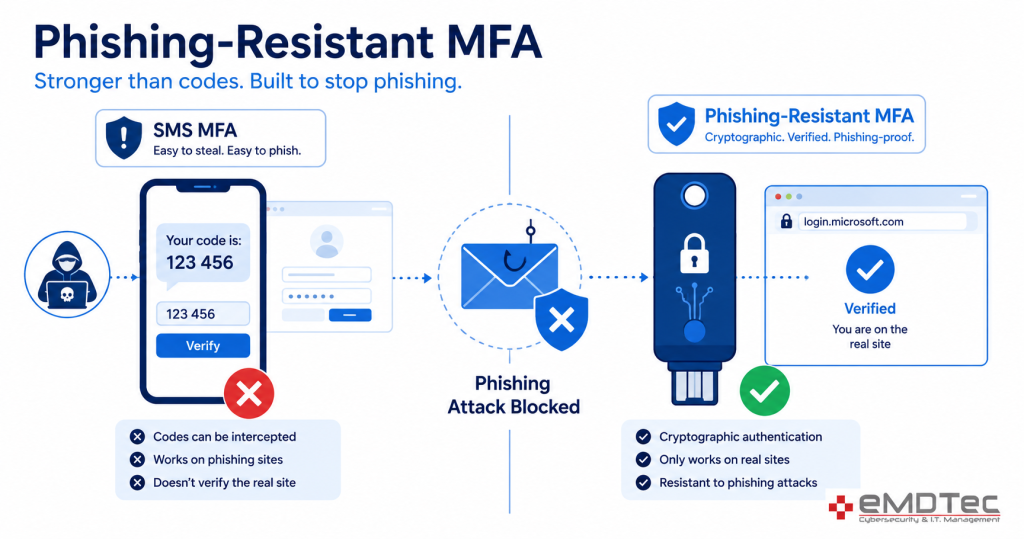
Not all MFA offers the same credential theft protection. SMS text codes are better than nothing, but they can be intercepted through SIM swapping and are routinely captured by the real-time phishing kits described above. Authenticator apps with number matching are a meaningful step up. Phishing-resistant MFA, meaning FIDO2 hardware keys and passkeys, is the strongest option, because they are cryptographically bound to the real website and simply will not work on a fake login page. Our post on phishing-resistant MFA versus SMS codes explains the difference in detail.
2. Phishing-Resistant MFA, Passkeys, and Passwordless Sign-In
The most durable credential theft protection removes the password from the equation entirely. Passkeys, built on the FIDO2 standard, let a user sign in with the fingerprint or face unlock on their phone or laptop. There is no shared secret for a phishing page to capture and nothing for an infostealer to harvest from a password vault. Microsoft 365, Google Workspace, Apple, and a growing list of business applications support passkeys today, and Windows Hello for Business brings the same approach to the desktop login.
Single sign-on (SSO) through your identity provider then extends that one strong login to the rest of your applications, so staff have fewer passwords to manage and attackers have fewer doors to try. See our guide to passkeys for business for a rollout plan.
3. Conditional Access and Device Trust
Even with MFA, credential theft protection improves when you add rules about where and how a login is allowed. Conditional Access policies in Microsoft 365, and equivalent features in other platforms, let you block sign-ins from countries you do not do business with, require a company-managed and healthy device for access to sensitive data, force re-authentication for risky sessions, and shut down legacy protocols that bypass MFA entirely. These rules are the difference between MFA that is merely enabled and MFA that is actually enforced. If your tenant still relies on the basic defaults, our comparison of Security Defaults versus Conditional Access walks through when to upgrade.
4. Privileged Access Management and Least Privilege
Administrator accounts, executive mailboxes, and finance logins are worth far more to an attacker than a front-desk account, and they are targeted accordingly. Privileged access management (PAM) principles are the credential theft protection layer that limits the damage a stolen credential can do:
- Separate admin accounts from daily-use accounts, so a phished email login does not carry global admin rights.
- Grant elevated access just in time, for a defined task and period, rather than permanently.
- Remove local administrator rights from staff workstations, which blocks most infostealer and ransomware installs at the source. Our article on why employees shouldn’t have admin rights covers how to do this without disrupting work.
- Vault shared and service-account credentials in a managed password system with logging, instead of a spreadsheet or a sticky note.
5. Sign-In Monitoring and Anomaly Detection
Prevention will never be perfect, so credential theft protection also has to include detection. Modern identity platforms score every sign-in using signals such as impossible travel (a login from Verona at 9:00 a.m. and from overseas at 9:20), unfamiliar devices, unusual hours, repeated failures, and known malicious IP addresses. The important part is that someone acts on those alerts. New inbox forwarding rules, MFA method changes, and mass file downloads are the classic signs that an account has already been compromised, and a managed detection and response service can investigate and contain those within minutes rather than weeks.
6. Password Managers and Dark Web Monitoring
Until every application supports passkeys, employees will still have passwords, and credential theft protection has to account for them. When people ask how to prevent credential theft on the dozens of sites that still use passwords, the answer is a business password manager. It generates a unique, strong password for every site, fills it only on the legitimate domain (which quietly defeats many phishing pages), and gives you visibility into weak or reused credentials across the company. Pair it with dark web monitoring that alerts you when a company email address appears in a new breach dump, so you can force a reset before the attacker tries the password against your systems.
7. Zero Trust Architecture
Zero Trust is the principle that ties the previous six credential theft protection strategies together: never trust, always verify. Instead of assuming anyone inside the office network is legitimate, every request is evaluated on identity, device health, location, and behavior, every time. For a small business this does not mean a massive re-architecture. It means MFA everywhere, Conditional Access rules, least-privilege accounts, managed devices, and continuous monitoring, which is exactly the list above. The CISA guidance on multi-factor authentication and its Zero Trust maturity model are good free references if you want to see how the federal government frames the same ideas.

Business Login Security by Industry: What NJ Regulators Expect
Credential theft protection is not only good practice. For most of the businesses eMDTec supports in Essex, Morris, Passaic, and Bergen counties, it is a compliance requirement with a specific regulator behind it.
Healthcare practices and HIPAA
The HIPAA Security Rule requires unique user identification, access controls, and audit logging for any system holding electronic protected health information. The proposed Security Rule update would make MFA mandatory rather than “addressable.” A compromised EHR or practice-management login is a reportable breach, and investigators will ask whether MFA was in place. Our HIPAA compliance consulting team configures Microsoft 365 and EHR access to that standard.
Accounting firms, tax preparers, and the FTC Safeguards Rule
The FTC Safeguards Rule explicitly requires multi-factor authentication for any individual accessing customer information, along with encryption, access reviews, and a written security program. Tax season is the peak period for credential phishing aimed at CPA firms, because a stolen portal login exposes hundreds of returns at once. Details are on our FTC Safeguards Rule compliance page.
Law firms and attorney-client privilege
Business email compromise against law firms frequently targets real estate closings and settlement payments, where a single altered wire instruction can cost a client six figures. Beyond the financial loss, a compromised attorney mailbox puts privileged communications in an outsider’s hands. MFA, Conditional Access, and payment verification procedures are the minimum credential theft protection for a firm that moves client money. Our IT support for law firms is built around those controls.
Financial advisors and SEC Regulation S-P
Registered investment advisors and broker-dealers must maintain an incident response program and notify affected customers within 30 days of a breach under the amended Regulation S-P. Custodian portals, CRM systems, and email all need strong business login security and documented credential theft protection, and examiners increasingly ask to see MFA enforcement reports.
The Role of Employee Training in Credential Theft Protection
Every technical credential theft protection control in this article can be undone by a well-meaning person approving an MFA prompt they did not initiate or typing a password into a convincing fake page. Human error remains a leading factor in breaches, and the fix is not blame but practice. An effective security awareness program for a small business includes:
- Short, recurring training on how to recognize phishing, including the current lures aimed at your industry.
- Simulated phishing campaigns that measure improvement and identify who needs extra coaching.
- Clear rules: never approve an MFA prompt you did not trigger, never reuse a work password, always use the company password manager.
- A no-penalty reporting culture, so a user who clicks tells IT immediately instead of hoping nobody notices.
- Verification procedures for any request to change payment details, reset a password, or add an MFA device, especially when the request arrives by phone or text.
Our guide on how to spot a scam email is a useful handout for staff, and training records double as credential theft protection evidence for HIPAA, Safeguards Rule, and cyber insurance reviews.

How to Prevent Credential Theft: A 30-Day Rollout Plan
Business owners often ask how to prevent credential theft without disrupting a busy office. The following sequence is what we typically use when we take over IT for a New Jersey practice or firm. It front-loads the highest-impact credential theft protection changes and spreads the user-facing ones over a month.
- Week 1: Inventory and quick wins. List every account with access to email, files, EHR or practice software, banking, and remote access. Disable accounts for anyone who has left. Enable MFA for all administrators immediately and turn off legacy authentication protocols.
- Week 2: MFA for everyone. Roll out authenticator-app MFA to all staff with a short training session. Register at least two methods per user so a lost phone does not become a lockout. Enforce it through Conditional Access rather than leaving it optional.
- Week 3: Reduce the blast radius. Remove local admin rights from workstations, separate admin accounts from daily accounts, deploy the business password manager, and set up dark web monitoring for the company domain.
- Week 4: Detect and respond. Enable and retain audit logging, configure alerts for forwarding rules, MFA changes, and risky sign-ins, and connect them to a person or a managed detection service. Run the first phishing simulation and schedule quarterly access reviews.
From there, plan the move to phishing-resistant MFA and passkeys for the accounts that matter most: administrators, executives, finance, and anyone who handles client data.
What to Do When a Login Is Compromised
Credential theft will eventually happen to someone in your organization no matter how good your credential theft protection is. The difference between a minor incident and a reportable breach is how quickly you respond. When you suspect an account has been compromised:
- Reset the password and revoke all active sessions and tokens, not just the password. Attackers who stole a session cookie stay logged in otherwise.
- Review and remove any MFA methods, app registrations, or mailbox rules the attacker added.
- Check the sign-in and audit logs to establish what was accessed, when, and from where.
- Warn anyone the compromised account may have emailed, and verify any payment instructions sent during the window.
- Determine whether regulated data was accessed and whether HIPAA, the Safeguards Rule, New Jersey breach-notification law, or your cyber insurance policy requires a report.
Our step-by-step article on what to do after a cyberattack covers the full 24-hour response timeline.
Credential Theft Protection: Frequently Asked Questions
Is MFA enough to stop credential theft?
MFA stops the large majority of automated attacks, but real-time phishing kits can capture SMS and app codes, and session-cookie theft bypasses MFA entirely. Pair MFA with Conditional Access, device management, monitoring, and a move toward phishing-resistant MFA for full credential theft protection.
What is the most common sign of a stolen business login?
A new inbox rule that forwards or hides messages is the classic indicator, followed by sign-ins from unfamiliar locations, unexpected MFA prompts, and colleagues or clients reporting strange emails from the account.
Should a small business use passkeys yet?
Yes, at least for administrators, executives, and finance staff. Microsoft 365 and Google Workspace support them today, the user experience is simpler than typing codes, and they cannot be phished.
How often should we review who has access to what?
Quarterly for standard accounts and monthly for privileged accounts, plus immediately whenever someone leaves or changes roles. Offboarding gaps are one of the most common credential theft protection failures we find, because they leave long-lived stolen credentials in play.
Does credential theft protection help with cyber insurance?
Directly. Most carriers now require MFA on email, remote access, and privileged accounts as a condition of coverage, and demonstrated controls such as Conditional Access, EDR, and awareness training can lower premiums and prevent a denied claim.
Lock Down Your Business Logins With eMDTec
Attackers are not getting less sophisticated, and the stolen-credential market is not going away. The good news is that the credential theft protection controls that stop them, MFA, Conditional Access, least privilege, monitoring, and trained staff, are affordable and well understood. eMDTec has delivered credential theft protection and cybersecurity services to New Jersey medical practices, law firms, accounting firms, and professional services businesses since 2002, as part of our managed IT services. Schedule a free consultation and we will review your current login security, show you where the business login security gaps are, and give you a prioritized plan to close them.
Originally republished with permission from The Technology Press; substantially expanded and updated by eMDTec for New Jersey businesses.