

 Managed IT Services
Multi-factor authentication (MFA) is one of the most effective security controls a small business can turn on. It requires a second proof of identity, such as an app prompt, a security key, or a fingerprint, before anyone can log in. Even if a password is stolen, the attacker can’t get in without that second factor. But with so many options, what is the best MFA solution for SMBs?
The short answer: the best MFA solution for SMBs is the one that protects every important account, fits the tools you already use, and that your staff will actually use without workarounds. For most small businesses, that means starting with the MFA built into Microsoft 365 or Google Workspace, then adding phishing-resistant options for high-risk users.
In this guide, we explain how MFA works, how well it stops attacks, the five options we see most often, and how eMDTec helps New Jersey businesses choose and roll out the right one.

What Is MFA?
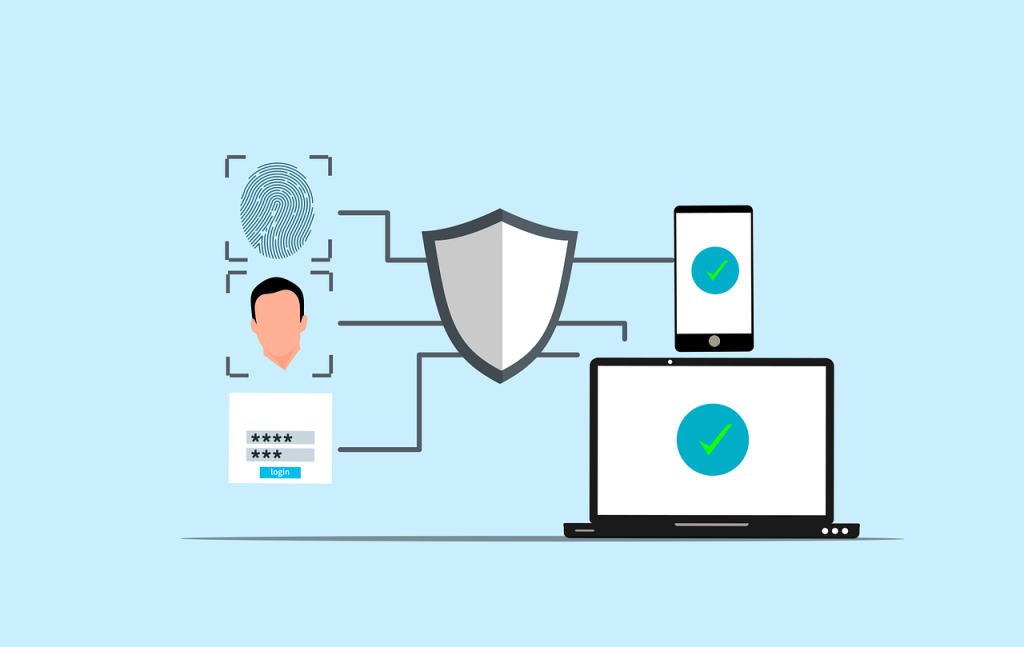
MFA is a login process that requires two or more independent types of proof before granting access. Those factors fall into three categories:
- Something you know: a password or PIN.
- Something you have: a phone with an authenticator app, a hardware security key, or a smart card.
- Something you are: a fingerprint or face scan.
Because each factor works independently, a criminal who steals one, usually the password, still can’t log in. That’s why insurers, regulators, and the federal Cybersecurity and Infrastructure Security Agency (CISA) all recommend MFA for every business.
How Successful Is MFA at Stopping Cyberattacks?
Very, which is why finding the best MFA solution for SMBs is worth the effort. Microsoft has reported that more than 99.9% of compromised accounts it sees did not have MFA turned on, and its later research found MFA reduced the risk of account compromise by more than 99%. Most attacks on small businesses start with a stolen or guessed password, through phishing, password reuse, or brute-force attempts. MFA shuts that door.
MFA isn’t perfect, though. Attackers have adapted with tactics such as:
- MFA fatigue: flooding a user with push notifications until they tap “approve” to make them stop.
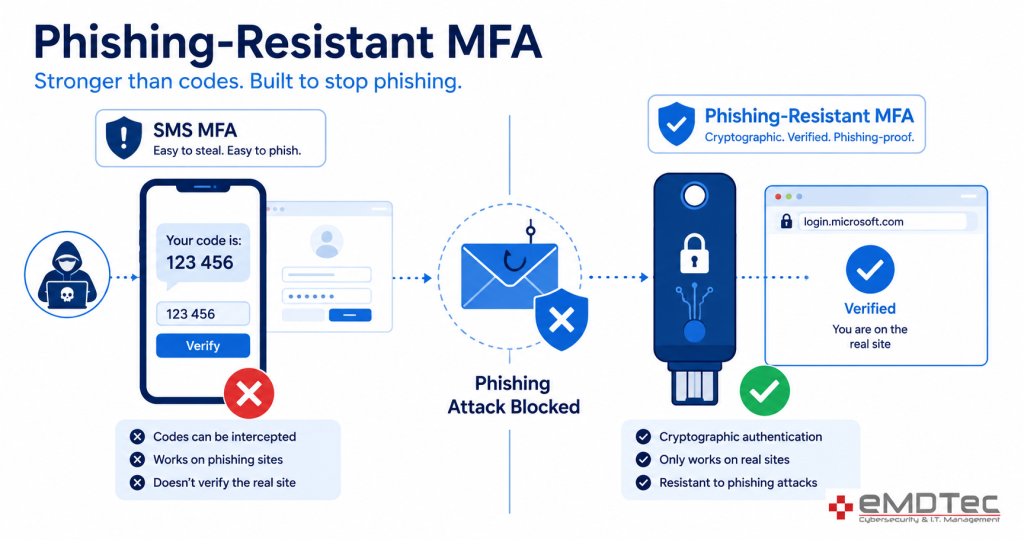
- SIM swapping: convincing a mobile carrier to move a victim’s number to the attacker’s phone to intercept text codes.
- Adversary-in-the-middle phishing: fake login pages that capture both the password and the one-time code in real time.
That’s why choosing the best MFA solution for SMBs isn’t just about turning MFA on. The type of MFA matters. We cover these attacks in more depth in The MFA Level-Up: Beyond SMS Codes.
Types of MFA, From Weakest to Strongest
| Method | Protection level | Notes |
|---|---|---|
| Text message (SMS) codes | Basic | Better than nothing, but vulnerable to SIM swapping and phishing |
| Email codes | Basic | Only as secure as the email account itself |
| Authenticator app codes | Good | Not tied to your phone number, but codes can still be phished |
| Push notifications with number matching | Strong | Number matching blocks most MFA fatigue attacks |
| Passkeys and FIDO2 security keys | Strongest (phishing-resistant) | Won’t work on fake websites, so they defeat most phishing |
For most businesses, the best MFA solution for SMBs uses authenticator-app push with number matching as the practical baseline, with phishing-resistant passkeys or security keys for owners, finance staff, and IT admins. Learn more in our article on phishing-resistant MFA.
What Is the Best MFA Solution for SMBs? 5 Options Compared
There isn’t one best MFA solution for SMBs that fits every business, and vendors’ marketing rarely makes the trade-offs clear. Here are the five options we see most often and where each fits.
1. Microsoft Entra ID MFA (Microsoft 365)
If your business runs on Microsoft 365, the MFA built into Microsoft Entra ID (formerly Azure Active Directory) is usually the best MFA solution for SMBs to start with. You can enable it at no extra cost through Security Defaults, and the Microsoft Authenticator app supports number matching and passkeys. Microsoft 365 Business Premium adds Conditional Access, which lets you require stronger MFA for risky sign-ins or block logins from unexpected countries. Microsoft’s documentation on how Entra MFA works covers the options in detail.
2. Cisco Duo
Cisco acquired Duo Security in 2018, and Duo remains popular with small businesses that need MFA beyond Microsoft 365. Duo protects VPNs, remote desktop, on-premises servers, and many line-of-business applications. It supports push with verified codes, hardware tokens, passkeys, and device health checks, which makes it a strong choice for practices running older or on-premises software. For many medical offices, Duo is the best MFA solution for SMBs that still depend on on-premises systems.
3. Google Workspace 2-Step Verification
For Google Workspace businesses, built-in 2-Step Verification supports Google prompts, authenticator apps, passkeys, and security keys. Admins can enforce it across the organization and require security keys for high-risk users.
4. Hardware security keys (FIDO2)
For high-risk users, hardware keys are often the best MFA solution for SMBs. Physical keys, such as YubiKeys, plug into a USB port or tap a phone. They’re phishing-resistant, fast, and don’t depend on a phone. They cost more per user and need a plan for lost keys, so most small businesses issue them to owners, finance staff, and administrators first.
5. Passkeys
Passkeys replace passwords with a cryptographic key stored on your device, unlocked with a fingerprint, face scan, or PIN. They’re phishing-resistant and easy to use, and the FIDO Alliance standard behind them is supported by Microsoft, Google, and Apple. Many businesses are now adding passkeys as their primary sign-in method. See our guide on passkeys for business.

How to Choose the Best MFA Solution for SMBs
When we help clients pick the best MFA solution for SMBs, we look at six questions:
- What platform do you already use? Microsoft 365 and Google Workspace both include strong MFA. Start there before buying anything new.
- What else needs protecting? VPNs, remote desktop, practice management software, and line-of-business apps may need a tool like Duo.
- Which users are highest risk? Owners, anyone who approves payments, and IT admins should get phishing-resistant MFA.
- What do regulations require? The FTC Safeguards Rule requires MFA for anyone accessing customer information, and the proposed HIPAA Security Rule update would make MFA mandatory for healthcare.
- What does your cyber insurer ask? Most carriers now require MFA on email, remote access, and admin accounts.
- Will your staff actually use it? The best MFA solution for SMBs is one employees don’t try to bypass.
The Best MFA Solution for SMBs by Business Type
Your industry and software stack shape the right answer. Here’s how we usually match clients to the best MFA solution for SMBs in their situation.
| Business type | Typical setup | Our usual recommendation |
|---|---|---|
| Microsoft 365 office, mostly cloud apps | Email, Teams, SharePoint, a few SaaS tools | Entra ID MFA with Microsoft Authenticator and Conditional Access; passkeys for admins |
| Medical or dental practice | On-premises EHR, remote access for providers | Entra ID MFA for email plus Duo for remote access and on-premises servers |
| Accounting or tax firm | Tax software, client portal, seasonal staff | Entra ID or Google MFA everywhere, security keys for partners, Duo where apps lack built-in MFA |
| Law firm | Document management, remote work, client file sharing | Conditional Access with phishing-resistant MFA for attorneys handling sensitive matters |
| Google Workspace business | Gmail, Drive, Chrome devices | Google 2-Step Verification with passkeys or security keys enforced |
In every case, the best MFA solution for SMBs covers email first, remote access second, and every system with client or financial data after that.
MFA Requirements for Regulated Small Businesses
For many of our clients, MFA isn’t just smart. It’s required.
Accounting firms, tax preparers, and financial businesses
The FTC Safeguards Rule requires MFA for any individual accessing any information system that holds customer information. That applies to tax preparers, many accounting firms, mortgage brokers, and other non-bank financial businesses. Choosing the best MFA solution for SMBs in this category means covering tax software, client portals, and remote access, not just email.
Healthcare practices
HIPAA already requires access controls that protect ePHI, and the Security Rule update proposed by HHS would make MFA mandatory in most situations. Practices that roll out MFA now avoid a rushed project later.
Law firms and professional services
Bar associations increasingly treat reasonable cybersecurity as part of a lawyer’s duty of competence and confidentiality, and corporate clients often require MFA in their outside counsel guidelines.
Anyone with cyber insurance
Most cyber insurance applications ask whether MFA is enforced for email, remote access, and privileged accounts. Answering “yes” when it isn’t fully deployed can put a claim at risk.
How Much Does MFA Cost?
Less than most owners expect. Microsoft 365 and Google Workspace include MFA at no extra cost, and Microsoft 365 Business Premium adds Conditional Access for stronger policies. Third-party tools like Duo charge per user per month, with lower-cost tiers for small teams. Hardware security keys are a one-time purchase per user.
The bigger cost is usually setup and support: inventorying accounts, configuring policies, enrolling users, and handling lost phones. That’s where a managed IT provider earns its keep. Compared to the cost of a single compromised email account, which can lead to wire fraud, client notification, and forensic bills, the best MFA solution for SMBs pays for itself quickly.
Signs Your Current MFA Isn’t Enough
- Some users or apps are still exempt “for convenience.”
- Staff mostly use text-message codes.
- Push notifications don’t require number matching.
- Legacy email protocols are still enabled.
- Admin accounts use the same MFA as everyone else.
- No one reviews sign-in alerts or risky logins.
If any of these sound familiar, it’s time to revisit whether you’re really using the best MFA solution for SMBs like yours, or just the easiest one to switch on.
Rolling Out MFA Without Disrupting Your Team
Turning on MFA overnight can lock people out and flood your phones with calls. A planned rollout avoids that.
- Inventory your accounts. Include email, cloud apps, remote access, banking, payroll, and admin accounts, plus shared mailboxes and service accounts.
- Start with admins and executives, then roll out to everyone else in groups.
- Communicate in advance. Tell staff what’s changing, why, and what to expect on login day.
- Set up backup methods so a lost phone doesn’t mean a lost day.
- Turn on number matching and alerts for suspicious sign-ins.
- Close the gaps. Disable legacy authentication protocols that bypass MFA.
- Review quarterly to catch new apps and new hires who were missed.
Quick Start: Turning On MFA in Microsoft 365
Because Microsoft 365 is the most common platform among our clients, Entra ID MFA is often the best MFA solution for SMBs to deploy first. Here’s the high-level process we follow:
- Check your licenses. All Microsoft 365 plans can use Security Defaults. Business Premium includes Conditional Access for more control.
- Protect admin accounts first. Require MFA, ideally a passkey or security key, for every global and billing admin.
- Choose your policy approach. Use Security Defaults for very small, simple environments, or Conditional Access policies if you need exceptions, location rules, or device requirements.
- Enable Microsoft Authenticator with number matching and turn off SMS for users who can use the app.
- Block legacy authentication so older protocols can’t bypass MFA.
- Enroll users in waves with clear instructions and a help line.
- Monitor sign-in logs and risky sign-in alerts after rollout.
Done this way, most small offices can move to MFA in a week or two with very little disruption.
MFA for Remote and Hybrid Teams
Remote work makes MFA even more important, because logins come from home networks, coffee shops, and personal devices. Pair MFA with device requirements so only company-managed, up-to-date laptops can reach sensitive data. Our mobile and endpoint security service handles device management alongside MFA, so the best MFA solution for SMBs with remote staff covers both the person and the device.
Where MFA Is Heading: Passwordless Sign-In
The industry is moving toward passwordless authentication, where passkeys replace passwords entirely. That removes the thing attackers steal most often. You don’t need to go passwordless overnight, but when you evaluate the best MFA solution for SMBs today, choose one that supports passkeys so you’re ready for that shift.
Common MFA Mistakes Small Businesses Make
- Protecting email but not everything else. Remote access, payroll, and banking need MFA too.
- Relying only on text messages. SMS is better than nothing but is the easiest form to defeat.
- Leaving legacy protocols on. Older email protocols can let attackers skip MFA entirely.
- Exempting the boss. Executives are the most targeted users and need the strongest protection.
- No process for lost phones. Without one, staff pressure IT to turn MFA off “just for now.”
Frequently Asked Questions
What is the best MFA solution for SMBs on a tight budget?
If you already pay for Microsoft 365 or Google Workspace, the built-in MFA costs nothing extra and is a strong starting point. Use an authenticator app instead of text messages, and add security keys or passkeys for your highest-risk users.
Is SMS-based MFA still acceptable?
It’s better than a password alone, but it’s the weakest form of MFA. Move users to an authenticator app or passkeys wherever you can.
Do we need MFA for compliance?
Often, yes. The FTC Safeguards Rule requires MFA for covered financial businesses, including tax preparers and many accounting firms, and cyber insurers commonly require it. Healthcare practices should plan for MFA as HIPAA requirements tighten.
Is Microsoft Authenticator or Duo better for a small business?
If everything you use runs through Microsoft 365, Microsoft Authenticator is usually simpler and costs nothing extra. If you also need to protect VPNs, remote desktop, or on-premises applications that don’t support Microsoft sign-in, Duo fills those gaps. Many of our clients use both.
Should we require MFA on personal phones?
Most employees are comfortable using an authenticator app on their own phone, since it doesn’t give the company access to personal data. For staff who prefer not to, a hardware security key is a good alternative.
What happens if an employee loses their phone?
With a planned rollout, the user signs in with a backup method or contacts IT, who verifies their identity and resets their MFA. The lost device can then be removed from their account.
Partner with eMDTec to Protect Your Business
Choosing the best MFA solution for SMBs is only half the job. The other half is rolling it out cleanly, closing the gaps attackers look for, and keeping it current as your business changes.
eMDTec has protected New Jersey businesses since 2002. We’re vendor-agnostic, so we’ll recommend the best MFA solution for SMBs based on your platform, applications, compliance requirements, and budget, then handle the rollout and support. MFA is part of our broader cybersecurity services, which also include endpoint protection, 24/7 monitoring, and staff training.
We also help clients answer cyber insurance questionnaires about MFA accurately, train staff on what a legitimate prompt looks like, and set up alerts so suspicious sign-in attempts get investigated quickly. If you already have MFA in place, we can audit your configuration for gaps such as exempt users, legacy protocols, or text-message codes on admin accounts, and recommend practical upgrades that fit your budget.
Not sure your MFA setup would stop a modern phishing attack? Schedule a free consultation and we’ll review it with you.