

 Managed IT Services
The holidays are when people are busiest, most distracted, and most likely to click before they think. Scammers know it. Between Thanksgiving and New Year’s, inboxes fill with order confirmations, shipping notices, donation requests, and year-end invoices, and a growing share of them are fake.
This guide covers the holiday cyber scams we expect to see most this season, how to spot each one, and what to do if someone on your team takes the bait. Some target shoppers. Others target businesses directly, especially when offices run on skeleton staff over the holidays. Share it with your employees before the long weekend.
Why Holiday Cyber Scams Spike Every Year
Holiday cyber scams aren’t new, but they keep getting bigger. The Federal Trade Commission reported that consumers lost a record $15.9 billion to fraud in 2025, up from about $12 billion the year before. Imposter scams, where someone pretends to be a company, a government agency, or someone you know, were again the most reported type of fraud.
The FBI’s Internet Crime Complaint Center reported even larger numbers: more than $20 billion in losses in 2025, with business email compromise alone accounting for over $3 billion. The FBI also tracked scams tied to AI, with more than 22,000 complaints and nearly $900 million in losses.
Holiday cyber scams are a big slice of that. In its December 2025 warning, the FBI said shoppers lost more than $785 million to non-delivery and non-payment scams the previous year, plus about $199 million to credit card fraud, with phishing and spoofing as the most common way in.
Three things make the season especially risky:
- Volume. More online orders mean more real shipping notices, so fake ones blend in.
- Urgency. Deadlines, limited-time deals, and travel plans push people to act fast.
- Thin coverage. Offices close early, staff take time off, and fewer people are watching for anything unusual.
12 Holiday Cyber Scams to Watch For This Season
Here are the holiday cyber scams we see most often, grouped by who they target. Most work the same way: create urgency, impersonate someone you trust, and get you to click, pay, or share a password.
1. Fake delivery and package texts
“Your package could not be delivered. Update your address here.” Fake delivery text scams are among the most common holiday cyber scams because almost everyone is expecting a package. The link leads to a fake carrier page that asks for a small “redelivery fee,” which captures your card number, or for your login details.
How to spot it: Real carriers rarely ask for payment by text. Check the tracking number on the carrier’s official app or website, never through the link in the message.
2. Fake order confirmations and account alerts
An email says your order of an expensive laptop has shipped, or that your shopping account has been locked. You didn’t place the order, so you click “Cancel order” or call the number listed. That’s the trap. The link steals your password, and the phone number connects you to a scammer posing as customer support.
How to spot it: Open the retailer’s app or type its address yourself to check your account. Never call a phone number from an unexpected email.
3. Fake shopping sites and too-good-to-be-true deals
Social media ads and search results lead to cloned store sites offering popular items at huge discounts. You pay, and nothing arrives, or a cheap knockoff does. Some of these holiday cyber scams also capture card details for later fraud. Our post on Google search ad scams shows how convincing these ads can look.
How to spot it: Check that the web address exactly matches the real retailer. Be suspicious of new sites, prices far below everyone else, and sellers who only accept unusual payment methods.
4. Gift card scams
Gift card scams spike every holiday season. Scammers love gift cards because once the numbers are shared, the money is gone and almost impossible to trace. Any request to pay a bill, a fine, a tech support fee, or an “urgent” favor with gift cards is a scam. The FBI says it plainly: legitimate sellers and agencies don’t ask for payment in gift cards.
How to spot it: If anyone asks you to buy gift cards and send them the numbers, stop. That one request is enough to know it’s fraud.
5. Charity and disaster donation scams
Generosity peaks in November and December, and so do fake charities. Scammers use names that sound like real organizations, emotional stories, and pressure to give right now.
How to spot it: Give directly through the charity’s official website. Look up unfamiliar organizations before donating, and be wary of anyone asking for donations by gift card, wire transfer, or cryptocurrency.
6. Holiday phishing emails with e-cards, coupons, and party invites
Holiday phishing emails use seasonal themes to lower your guard: a digital greeting card, a coupon, a company party invitation, or a “holiday schedule” attachment. One click can install malware or open a fake Microsoft 365 sign-in page. Our guide on how to spot a scam email walks through the warning signs.
How to spot it: Hover over links before clicking. If an email asks you to sign in to see a card or a document, close it and go to the site directly.
Holiday Cyber Scams That Target Businesses
Not all holiday cyber scams aim at shoppers. Some of the most expensive ones go after businesses, where a single wire transfer can be worth more than thousands of stolen credit cards.
7. Fake invoices and vendor bank changes
Year-end is when businesses pay a lot of bills, and accounting teams are busy. Scammers send invoices that look like they come from real vendors, or emails saying a vendor’s bank details have changed. This is business email compromise, and it’s the most costly form of cybercrime the FBI tracks.
How to stop it: Verify every change in payment instructions by phone, using a number you already have on file, not one from the email. Require two people to approve new or changed payment details.
8. The “boss needs gift cards” request
An email or text that looks like it’s from the owner or a manager asks an employee to quickly buy gift cards “for client thank-yous” or “staff holiday bonuses,” and to send the codes as soon as possible. The message often says the boss is in a meeting and can’t talk.
How to stop it: Make it a written policy that leadership will never ask for gift cards by email or text. Tell every employee about it before the holidays.
9. AI voice cloning and deepfake calls
With a few seconds of audio from a video or voicemail, scammers can now clone a person’s voice. They use it to call an employee “from the CEO” asking for an urgent payment, or to call a family member pretending to be a relative in trouble. These holiday cyber scams are harder to spot because the voice sounds real. We covered this in detail in our post on the deepfake CEO scam.
How to stop it: Agree on a verification step for any urgent money request, such as calling the person back on a known number or using a code word. Urgency plus secrecy is a red flag, no matter whose voice is on the line.
10. Fake benefits, bonus, and HR messages
Open enrollment, year-end bonuses, and new tax forms give scammers easy cover. Emails titled “Your 2027 benefits selection,” “Holiday bonus details,” or “Updated W-2 information” lead to fake sign-in pages that steal employee passwords, or ask for personal details like Social Security numbers and direct deposit information.
How to stop it: HR and payroll changes should only happen through your real HR or payroll portal. Any request to change direct deposit details by email should be confirmed in person or by phone.
11. Malicious QR codes
QR codes show up on fake parking notices, flyers, package stickers, and even emails designed to slip past security filters. Scanning one can lead to a fake payment page or a credential-stealing site. The FBI specifically flagged tampered QR codes in its holiday warning.
How to stop it: Treat a QR code like a link. Check the address that appears before opening it, and never enter a password or payment details on a page you reached by scanning an unexpected code.
12. Holiday-timed ransomware and account takeovers
Attackers know offices are lightly staffed around holidays. They often break in weeks earlier with a stolen password, then wait for a long weekend to launch ransomware or start sending fraudulent emails from a real company account, when it’s least likely anyone will notice quickly.
How to stop it: Make sure someone is monitoring your systems around the clock, including holidays. Our managed IT services include 24/7 monitoring and emergency support for exactly this reason.
Holiday Cyber Scams Calendar: When to Expect Each One
Holiday cyber scams follow the calendar. Knowing what tends to show up when helps your team stay one step ahead.
| When | What to watch for |
|---|---|
| Thanksgiving week | Fake Black Friday deals, cloned store sites, early “order shipped” emails, charity appeals |
| Black Friday through Cyber Monday | Fake order confirmations, account lockout alerts, social media ads for deals that don’t exist |
| Early to mid-December | Fake delivery text scams, holiday phishing emails with e-cards and party invites, gift card requests “from the boss” |
| Year-end | Fake invoices, vendor bank change requests, bonus and benefits phishing, holiday-timed account takeovers |
| After the holidays | Fake return and refund messages, gift card balance scams, fake tax form and W-2 requests as filing season starts |
The pattern is simple: scammers copy whatever real messages people are expecting at that moment. When your team knows what’s coming, holiday cyber scams lose their element of surprise.
Traveling for the Holidays? Watch Your Connections
Many employees travel over Thanksgiving and the December holidays, and they often keep working from airports, hotels, and relatives’ homes. That opens the door to a different set of holiday cyber scams.
- Fake Wi-Fi networks. Attackers set up hotspots with names like “Airport Free WiFi” to intercept traffic. Use a phone hotspot or a company VPN instead of open public Wi-Fi for anything work-related.
- Fake travel confirmations. Emails about changed flights or hotel bookings can lead to fake sign-in pages. Check reservations directly in the airline or hotel app.
- Lost and stolen devices. A laptop left in a rideshare can expose client data. Make sure company devices are encrypted, locked with a strong passcode, and can be wiped remotely.
- Shared family computers. Logging into work email on a relative’s computer can leave your password or session behind. Use your own device or a secure company portal.
A two-minute travel checklist before people leave the office prevents most of these problems.
Holiday Cyber Scams Warning Signs: A Quick Checklist
Almost all holiday cyber scams use one or more of these tricks. If you see any of them, slow down and verify:
- Pressure to act right now, or a deadline measured in hours
- A request to pay by gift card, wire transfer, cryptocurrency, or payment app
- A link or QR code you weren’t expecting
- A request to sign in to see an order, a document, or a greeting card
- A change in payment details or bank information
- A sender address or web address that’s slightly off
- A request to keep something secret or “not bother” anyone else
- A deal that’s far better than anyone else is offering
How to Protect Your Business From Holiday Cyber Scams
Training helps, but the best defense against holiday cyber scams is a mix of people, process, and technology. Before the Thanksgiving weekend, we recommend:
- Brief your team. Send this article, or a short version of it, to everyone. Five minutes now can prevent a very expensive mistake later.
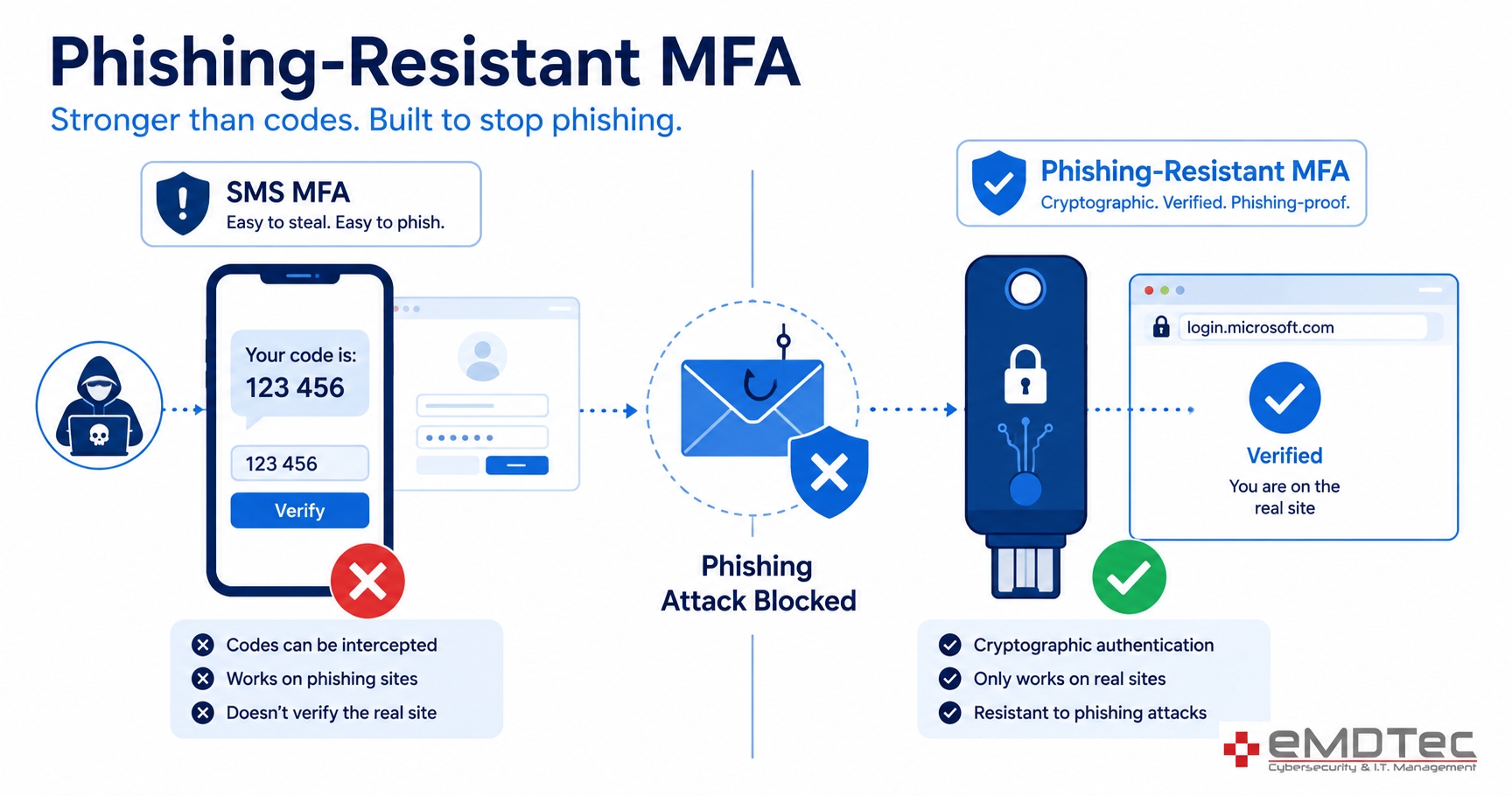
- Turn on multi-factor authentication everywhere. MFA stops most stolen-password attacks cold. For key accounts, consider phishing-resistant MFA.
- Lock down payment changes. Require phone verification and a second approver for any new vendor or changed bank details.
- Set a gift card rule. Leadership never requests gift cards by email or text. Say it out loud and put it in writing.
- Separate work and shopping. Ask employees not to do personal holiday shopping on work computers or work email accounts.
- Use safer payment methods. Credit cards and virtual card numbers offer better fraud protection than debit cards. Our post on password managers and virtual cards explains how.
- Keep devices updated. Install security updates before staff leave for the holiday.
- Know who’s watching. Confirm who will respond if something goes wrong over a long weekend, and make sure everyone has that number.
If your business handles sensitive client data, these steps also support your compliance obligations. Our cybersecurity services combine monitoring, email protection, and staff training so holiday cyber scams have a much harder time getting through.
Protecting Your Family From Holiday Cyber Scams
Holiday cyber scams don’t stop at the office. Older relatives are frequent targets of fake delivery texts, grandparent scams, and tech support pop-ups, and teenagers are often targeted through gaming and social media offers. A quick conversation over Thanksgiving dinner can help:
- Tell family members that no real company or agency will ask for gift cards.
- Agree on a family code word to use if someone calls claiming to be a relative in trouble.
- Remind everyone to check orders and tracking only through official apps.
- Help relatives turn on MFA for email and banking accounts.
- Make sure they know they can call you before paying anyone who contacts them unexpectedly.
What to Do If You Fall for a Holiday Scam
Even careful people get fooled by holiday cyber scams. What matters is how quickly you act. If you or someone on your team clicks a link, shares a password, or sends money:
- Act fast on payments. Call your bank or card company immediately. Fast action gives you the best chance of stopping or reversing a transfer.
- Change passwords. Reset the password for any account you entered on a suspicious page, and anywhere else you used the same password.
- Call your IT provider. If a work account or device is involved, report it right away. Disconnect the device from the network, but don’t turn it off.
- Report it. File a report with the FBI at ic3.gov and with the FTC at ReportFraud.ftc.gov.
- Watch your accounts. Check bank and credit card statements closely for the next few months.
Never feel embarrassed to report a mistake. The faster your IT team hears about it, the less damage a scam can do. For a full walk-through, see our guide on what to do after a cyberattack.
Frequently Asked Questions About Holiday Cyber Scams
What are the most common holiday cyber scams?
Fake delivery texts, fake order confirmations, fake shopping sites, gift card scams, charity scams, and holiday phishing emails are the most common. Businesses also see fake invoices, vendor bank change requests, and “boss needs gift cards” emails.
Why do scammers ask for gift cards?
Gift cards work like cash. Once you share the card numbers, the money can be spent almost instantly and is very hard to trace or recover. No legitimate business or government agency asks for payment in gift cards.
How can I tell if a delivery text is real?
Don’t use the link in the text. Open the carrier’s or retailer’s official app, or type the website address yourself, and check your tracking number there. Real carriers rarely ask for fees by text.
Are businesses really targeted during the holidays?
Yes. Many holiday cyber scams are aimed at businesses. Attackers know offices are busy at year-end and lightly staffed during holidays. Fake invoices, payment change requests, and account takeovers often spike during this time.
What should I do if an employee clicked a scam link?
Treat it like any other security incident, even if it looked like one of the harmless-seeming holiday cyber scams. Have them report it immediately, disconnect the device from the network without turning it off, and contact your IT provider. Reset the affected passwords and watch for unusual account activity.
Have a Safer Holiday Season
Holiday cyber scams rely on one thing: catching people when they’re busy and distracted. A few minutes of preparation, a couple of clear rules, and someone watching your systems over the long weekend go a long way. If you’d like help getting your business ready, or you want a second set of eyes on something suspicious, we’re here, including over the holidays.