

 Managed IT Services
For most of my career, documenting site visits has been my weak spot. I’d walk a prospect’s office, look at the network closet, talk through their pain points with the owner, and take notes on a pad or my phone while trying to stay in the conversation. By the time I got back to the car, half the details were already fuzzy.
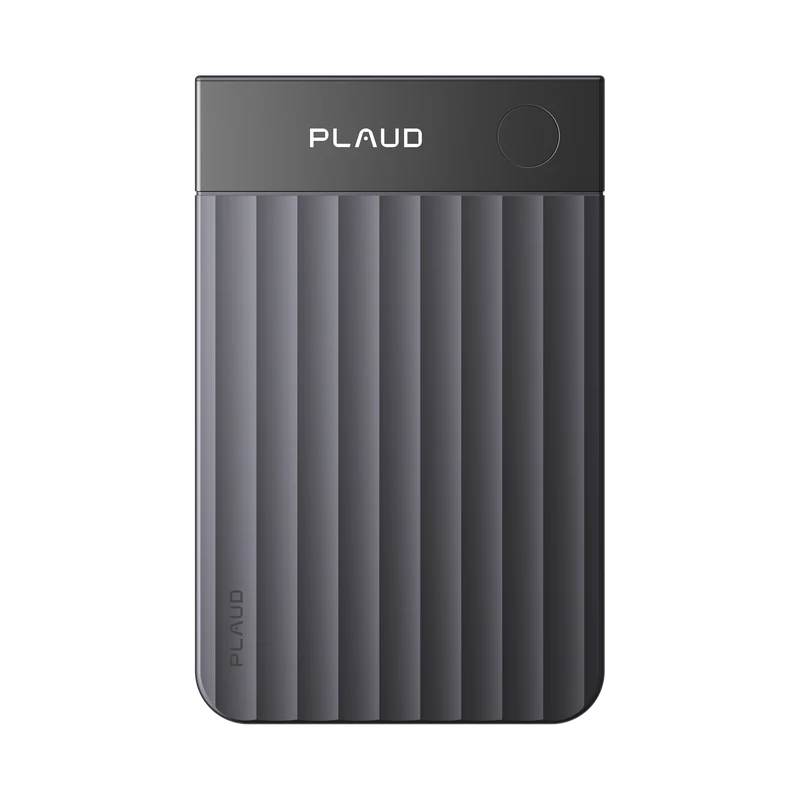
The Plaud Note Pro changed that for me. It’s a credit-card-sized AI voice recorder that records the conversation, transcribes it, and turns it into organized notes, and it lets me attach photos to the same recording. In this review, I’ll share how I use the Plaud Note Pro on visits with prospects and clients, what I like, the two things I’m not a fan of, and what any business should think about before bringing an AI note taker into client meetings.
Why Site Visit Documentation Was Always a Struggle
Anyone who does field work knows the problem. You’re doing two jobs at once: having a real conversation and capturing every detail you’ll need later. When I’m with a prospect or client, I want to listen, ask good follow-up questions, and look around. I don’t want to be heads-down scribbling.
But the details matter. Later, I’ll be writing a proposal, scoping a project, or briefing our technicians. If I miss what a client said about their backups, their phone system, or which software they can’t live without, the proposal is weaker and the project starts off on the wrong foot.
For years, my process was a mix of handwritten notes, scattered phone photos, and memory. It worked, but it wasn’t great. Photos lived in my camera roll with no context. Notes were incomplete. And turning all of it into something useful took longer than it should have.
Why Good Site Visit Notes Matter in IT
In our line of work, a site visit is where a good proposal starts. When we walk a prospect’s or client’s office, we’re paying attention to a lot at once:
- How the network is set up, and the condition of the closet or rack
- The age of computers, servers, printers, and firewalls
- How backups are handled, and whether anyone has tested them
- Which software the business depends on every day
- Wi-Fi coverage, guest access, and how devices connect
- The frustrations staff mention in passing, which often point to the real problems
Every one of those details shapes our recommendations. Miss one, and the proposal misses the mark. Capture them all, and the client gets a plan that fits their business. The Plaud Note Pro helps me capture them all, and it gives me something accurate to share with our technicians before they ever set foot on site. If you’d like a structured look at your own environment, our security risk assessment covers much of the same ground in a formal report, and our managed IT services keep it in good shape afterward.
What Is the Plaud Note Pro?
The Plaud Note Pro is a small AI note taker built for recording conversations and turning them into usable notes. According to Plaud’s product page, here’s what you get:
- A very small device. It’s about the size of a credit card, 0.12 inches thin, and weighs about an ounce. It attaches magnetically to the back of a phone.
- Four microphones plus a voice sensor, with a pickup range of up to about 16 feet.
- Long battery life. Up to 30 hours of continuous recording in its standard mode, up to 50 hours in its endurance mode, and up to 60 days on standby.
- 64 GB of storage on the device itself.
- A small screen that shows recording status at a glance.
- Two recording modes for in-person conversations and phone calls.
- Transcription in more than 112 languages, with AI summaries built from templates.
- Highlights. A short press of the button marks an important moment during a recording.
The device records. The Plaud app on your phone handles the transcription, summaries, highlights, and photos.
How I Use the Plaud Note Pro on Site Visits
Here’s what a site visit looks like for me now with the Plaud Note Pro.
Before the visit
I make sure the device is charged and connected to the Plaud app. When I arrive, I let everyone know I’d like to record so I can focus on the conversation instead of my notepad. It’s the right thing to do, and it sets a professional tone.
During the conversation
I start the recording and put my notepad away. That’s the biggest change. I can look people in the eye, follow the conversation where it goes, and ask better questions because I’m not worried about writing everything down.
When someone says something important, like a contract renewal date, a recurring problem, or a must-have requirement, I press the button to mark a highlight. Later, those highlights take me straight to the moments that matter.
Walking the site
This is where the photos come in. While the recording is running, I can take pictures through the Plaud app of whatever I want to remember: equipment, labels, the network closet, a whiteboard, or a printed list someone hands me. Plaud attaches those photos to the recording, so the picture and the conversation about it stay together.
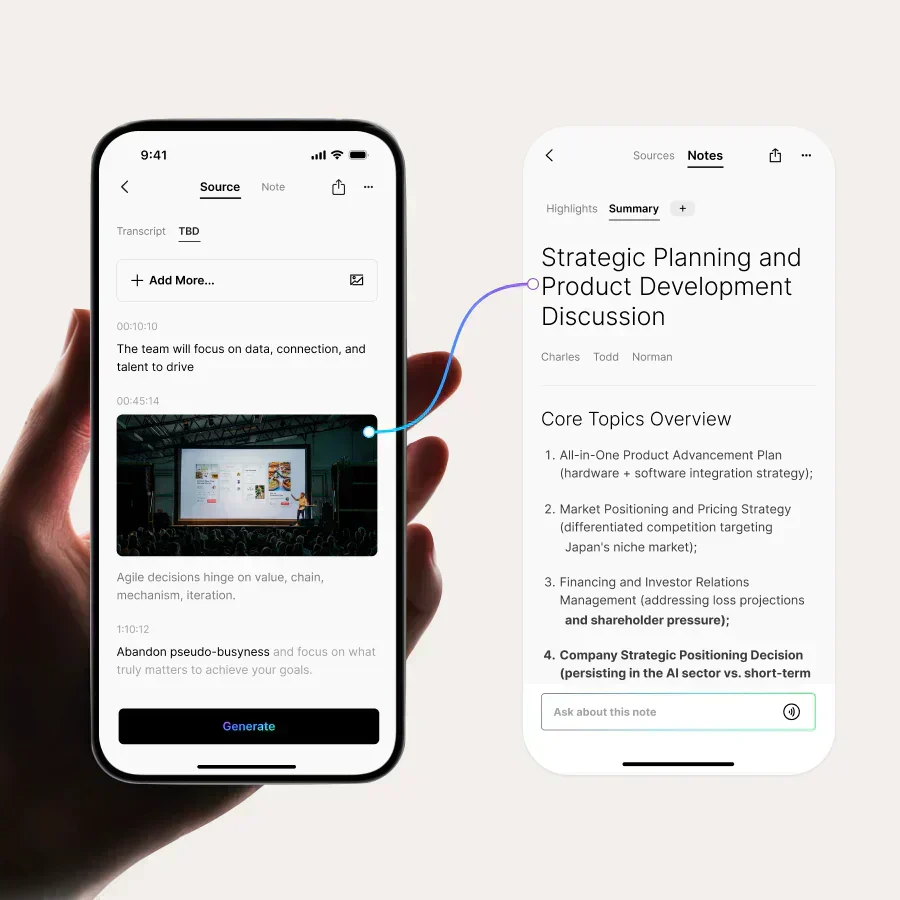
For someone who used to come home with a camera roll full of unlabeled photos and no idea which office they came from, that alone is worth a lot.
After the visit
Back at the office, or even in the car, I have a transcript, an AI summary, my highlights, and my photos in one place. Instead of reconstructing the meeting from memory, I start my proposal or project plan from a complete record. Follow-up emails are faster and more accurate, and nothing important falls through the cracks.
Plaud Note Pro vs. the Old Way of Taking Notes
Here’s how site visit documentation compares for me before and after the Plaud Note Pro.
| Task | Notepad and phone camera | Plaud Note Pro |
|---|---|---|
| Capturing the conversation | Partial notes, written while trying to listen | Full recording and transcript |
| Marking key moments | Underlines and stars in the margin | One button press creates a highlight |
| Photos | Mixed into the camera roll with no context | Attached to the recording they belong to |
| Summarizing the visit | Rebuilt from memory afterward | AI summary to review and edit |
| Finding details later | Flipping through notebooks | Searching transcripts in the app |
| Staying engaged | Eyes on the notepad | Eyes on the people in the room |
The table makes the point better than I can. The old way wasn’t wrong, but it asked me to do two jobs at once. The Plaud Note Pro lets me do one job well and trust the device with the other.
What I Like About the Plaud Note Pro
After using the Plaud Note Pro on visits with prospects and clients, these are the things that stand out.
I’m more present in the conversation
This is the real win. When I’m not taking notes, I listen better, and the people I’m meeting with can tell. Better conversations lead to better proposals.
Recording is easy
The device is small enough that it never gets in the way. Starting a recording takes a second, and the screen confirms it’s working, so I’m not wondering whether I actually hit record.
Everything lives in one place
The recording, transcript, summary, highlights, and photos all stay together. If I need to find what a client said about their internet provider weeks later, I know exactly where to look.
The battery lasts
With up to 30 hours of continuous recording in standard mode, I don’t worry about it dying in the middle of a long day of visits.
The summaries save real time
An AI summary isn’t perfect, and I always review it. But starting from a structured summary is much faster than starting from a blank page.

What I’m Not a Fan Of
No tool is perfect, and this review wouldn’t be honest without the downsides. There are two things I’d change about the Plaud Note Pro.
The charging cable
The Plaud Note Pro charges with its own magnetic cable rather than a standard USB-C port on the device. The other end of the cable is USB-C, but you still need that specific cable. If I forget it, I can’t just borrow a charger from someone. I now keep a spare cable in my bag, and I’d recommend you do the same.
Photo quality
My photos aren’t always as clear as I’d like. To be fair, this could be user error on my part. The photos are taken with your phone through the Plaud app, so lighting, focus, and holding the phone steady all matter. A few things I’m trying:
- Wiping the phone’s camera lens before the visit
- Tapping the screen to focus before taking the picture
- Using the phone’s flashlight in dark closets and server rooms
- Taking a second shot with the regular camera app for anything I’ll need to read later, like serial numbers or small labels
Neither issue is a deal-breaker. The benefits far outweigh them.
Tips for Getting the Most Out of an AI Voice Recorder on Site Visits
A few habits have made the Plaud Note Pro much more useful for me. They apply to any AI voice recorder you use for field work.
- Charge it the night before. The battery lasts a long time, but a quick top-up before a busy day removes any doubt. And keep that spare cable in your bag.
- Say the basics at the start. I begin each recording by stating the date, the company, and who’s in the room. It makes the transcript and summary much easier to find and use later.
- Use highlights generously. It’s better to mark too many moments than too few. Highlights are the fastest way back to what matters.
- Take photos while you talk about them. When I photograph a piece of equipment while discussing it, the photo and the conversation end up linked in the same recording.
- Pick a summary template that fits the meeting. A sales conversation and a technical walk-through need different summaries. Try a few templates and keep the ones that work.
- Review the summary the same day. AI summaries are a strong first draft, not a final answer. I read every one and correct anything it got wrong while the visit is still fresh.
- Move the important parts into your real systems. Key details belong in your CRM, project notes, or ticketing system, not only in a recording app.
Who Should Consider the Plaud Note Pro?
I started using the Plaud Note Pro for my own site visits, but it fits anyone who does field work and struggles to document it. Good candidates include:
- IT and technology consultants doing site surveys and client walk-throughs
- Contractors and inspectors who need to capture conditions and conversations on the job
- Sales professionals meeting prospects in person
- Property and facility managers walking buildings with vendors or tenants
- Insurance adjusters and appraisers documenting site conditions
- Business owners and managers who spend their days in back-to-back meetings
If you’ve ever left a meeting thinking “I should have written that down,” a tool like this is worth a look. Our post on AI productivity tools for business owners covers other tools worth considering.

Before You Use an AI Note Taker With Clients
As an IT and cybersecurity company, we’d be doing you a disservice if we only talked about the convenience. Any AI note taker records sensitive conversations and sends them to the cloud for transcription. Before you bring a Plaud Note Pro or any similar device into client meetings, think through these points.
Get consent before you record
Recording laws vary by state. New Jersey and New York generally allow recording when one person in the conversation consents, but Pennsylvania generally requires everyone’s consent. The simplest rule is the one I follow: always tell people you’re recording and ask if it’s okay. It’s the right thing to do, and it builds trust. This isn’t legal advice, so check with your attorney if you have questions about your situation.
Know where your data goes
Recordings and transcripts are processed in the cloud. According to Plaud’s Trust Center, the company encrypts data in transit and at rest, says it doesn’t use customer data to train AI models unless you opt in, and lists SOC 2 Type 2, ISO 27001, GDPR, and HIPAA compliance. That’s a solid foundation, but you should still review the terms yourself and turn on the protections that fit your business, including strong passwords and multi-factor authentication on your Plaud account.
Be careful with regulated data
If you work in healthcare, finance, or law, think carefully before recording conversations that include patient information, client financial data, or privileged matters. Healthcare organizations should confirm whether a business associate agreement is available before recording anything that includes protected health information. Our HIPAA compliance consulting team can help you sort out what’s allowed.
Set a company policy
If your employees start using AI note takers on their own, you have a shadow IT problem. A short written policy covering which tools are approved, when recording is allowed, how consent is handled, and how long recordings are kept will save you headaches later. This is the same approach we take when helping clients adopt tools like Microsoft 365 Copilot safely.
Plaud Note Pro Review: My Bottom Line
The Plaud Note Pro solved a problem I’ve had my whole career. I’m more present in conversations, my notes are complete, my photos have context, and my proposals start from a full record instead of my memory.
It’s not perfect. I’d love a standard charging port, and I’m still working on getting clearer photos. But for anyone who does field work and has struggled to document it, the Plaud Note Pro is one of the most useful tools I’ve added in years.
Frequently Asked Questions
What does the Plaud Note Pro do?
It records in-person conversations and phone calls, then uses the Plaud app to transcribe them, create AI summaries, and organize highlights and photos you capture during the recording.
Can the Plaud Note Pro take photos?
The device itself records audio. Photos are taken with your phone through the Plaud app while a recording is running, and they’re attached to that recording.
How long does the battery last?
Plaud lists up to 30 hours of continuous recording in standard mode, up to 50 hours in endurance mode, and up to 60 days on standby.
Is it legal to record client meetings?
It depends on the state. Some states allow recording with one person’s consent, while others require everyone’s consent. The safest practice is to always ask permission before recording.
Is an AI note taker safe for sensitive business conversations?
It can be, with the right precautions. Review the vendor’s security and privacy practices, protect the account with MFA, avoid recording regulated data without the proper agreements in place, and set a clear company policy.
Want Help Choosing AI Tools for Your Business?
AI tools like the Plaud Note Pro can save your team real time, but they need to be set up with security and compliance in mind. If you’re thinking about bringing AI note takers or other AI tools into your business, we’re happy to help you choose the right ones and roll them out safely.