

 Managed IT Services

A zero-trust architecture roadmap starts with a hard truth: most small businesses aren’t breached because they have no security at all. They’re breached because a single stolen password becomes a master key to everything else.
That’s the flaw in the old “castle-and-moat” model. Once someone gets past the perimeter, they can often move through the environment with far fewer restrictions than they should.
And today, with cloud apps, remote work, shared links, and BYOD, the “perimeter” isn’t even a clearly defined boundary anymore.
Zero-trust architecture for small businesses represents the shift that breaks that chain reaction. It’s an approach that treats every access request as potentially risky and requires verification every time.
What Is Zero-Trust Architecture?
Zero Trust is a model that moves defenses away from “static, network-based perimeters.” Instead, it focuses on “users, assets, and resources.” It also “assumes there is no implicit trust granted to assets or user accounts” based only on network location or ownership.
Microsoft sets this idea as a simple principle: the model teaches us to “never trust, always verify.” In practice, that means verifying each request as though it came from an uncontrolled network, even if it’s coming from the office.
IBM reports that the global average cost of a data breach exceeds $4 million, which is why reducing the blast radius isn’t a nice-to-have.
So, what does “Zero Trust” actually do differently day to day?
Microsoft frames it around three core principles: verify explicitly, use least privilege access, and assume breach.
In small-business terms, that usually translates to:
- Identity-first controls: Strong MFA, blocking risky legacy authentication, and applying stricter policies to admin accounts.
- Device-aware access: Evaluating who is signing in and whether their device is managed, patched, and meets your security standards.
- Segmentation to limit impact: Breaking your environment into smaller zones so access to one area doesn’t automatically grant access to everything else. Cloudflare describes microsegmentation as dividing perimeters into “small zones” to prevent lateral movement between systems.

Before You Start
If you try to “implement Zero Trust” everywhere at once, two things usually happen:
- Everyone gets frustrated.
- Nothing meaningful gets completed.
Instead, start with a defined protected surface, a small group of critical systems, data, and workflows that matter most and can realistically be secured first.
What Counts as a “Protect Surface”?
A protect surface typically includes one of the following:
- A business-critical application
- A high-value dataset
- A core operational service
- A high-risk workflow
The 5 Surfaces Most Small Businesses Start With
If you’re unsure where to begin, this shortlist applies to most environments:
- Identity and email
- Finance and payment systems
- Client data storage
- Remote access pathways
- Admin accounts and management tools
BizTech makes the point that there’s no “Zero Trust in a box.” It’s achieved through the right mix of people, process, and technology.
The Zero-Trust Architecture Roadmap
This is where the zero-trust architecture roadmap stops being a concept and becomes a plan. Each phase builds on the one before it, so you get meaningful risk reduction without creating a security obstacle course.
1. Start with Identity
Network location should not be treated as a trusted signal. Access should be based on who or what is requesting it, and whether they should have access at that moment. That’s why identity is step one.
Do these first:
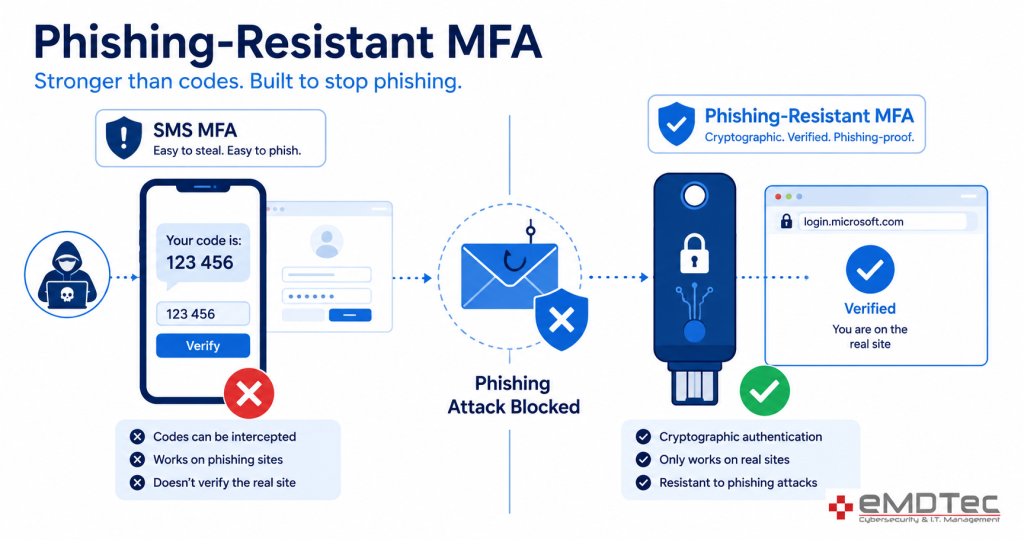
- Enforce multifactor authentication (MFA) everywhere
- Remove weak sign-in paths
- Separate admin accounts from day-to-day user accounts
2. Bring Devices into the Trust Decision
Zero Trust isn’t just asking, “Is the password correct?” It’s asking, “Is this device safe to trust right now?”
Microsoft’s SMB guidance explicitly calls out securing both managed devices and BYOD, because small businesses often have a mix.
Keep it simple:
- Set a clear baseline: patched operating systems, disk encryption, and endpoint protection
- Require compliant devices for access to sensitive applications and data
- Establish a clear BYOD policy: limited access, not unrestricted access
3. Fix Access
Microsoft’s principle here is “use least privilege access.” This means users should have only what they need, when they need it, and nothing more. This step is foundational to any zero-trust architecture roadmap.
Practical moves:
- Eliminate broad “everyone has access” groups and shared login accounts
- Shift to role-based access, where job roles determine defined access bundles
- Require additional verification for admin elevation, and make sure it’s logged
4. Lock Down Apps and Data
The old perimeter model doesn’t map cleanly to cloud services and remote access, which is why organizations shift towards a model that verifies access at the resource level. That shift is central to the zero-trust architecture roadmap outlined here.
Focus on your protect surface first:
- Tighten sharing defaults
- Require stronger sign-in checks for high-risk apps
- Clarify ownership: every critical system and dataset needs an accountable owner
5. Assume Breach
Microsegmentation divides your environment into smaller, controlled zones so that a breach in one area doesn’t automatically expose everything else.
That’s the whole point of “assume breach”: contain, don’t panic.
What to do:
- Segment critical systems away from general user access
- Limit admin pathways to management tools
- Reduce lateral movement routes
6. Add Visibility and Response
Zero Trust decisions can be informed by inputs like logs and threat intelligence. Because verification isn’t a one-time event, it’s ongoing
Minimum viable visibility:
- Centralize sign-in, endpoint, and critical app alerts
- Define what counts as suspicious for your protect surface
- Create a simple response plan
Your Zero-Trust Architecture Roadmap
A real zero-trust architecture roadmap doesn’t begin with a shopping list. It begins with a clear, focused plan.
If you’re ready to move from “good idea” to real implementation, start with a single protect surface and commit to the next 30 days of measurable improvements. Small steps, consistent execution, and fewer unpleasant surprises.
If you’d like help defining your protect surface and building a practical zero-trust architecture roadmap, contact us today for a consultation. We’ll help you prioritize the right controls, align them to your environment, and turn Zero Trust into steady progress, not complexity.


Budgeting and Sequencing the Zero-Trust Architecture Roadmap
The most common reason a zero-trust architecture roadmap stalls in a small business is that it is presented as one large project. It should be presented as a sequence of small ones, each with its own budget line and its own measurable result.
Phase one is identity, and it is mostly configuration rather than purchase: phishing-resistant MFA, Conditional Access policies, and removal of standing administrator rights. For a business already on Microsoft 365 Business Premium the licensing is in place, so this stage of the zero-trust architecture roadmap costs labor, not software, and it removes the largest share of risk.
Phase two of the zero-trust architecture roadmap is devices: enrolling every computer and phone in management, enforcing encryption and endpoint detection, and blocking unmanaged devices from company data. This is where most of the measurable security improvement shows up on insurance applications.
Phase three is the network and applications: segmenting guest, staff, and device networks; replacing the legacy VPN with zero-trust access to specific applications; and reviewing which SaaS platforms can be reached from where. Phase four is data: sensitivity labels, data loss prevention, and least-privilege sharing.
Each phase of the zero-trust architecture roadmap can be completed in a quarter by a small business with an engaged IT partner, and each produces evidence a cyber insurer or auditor will recognize. The order matters less than the momentum; starting with identity and finishing with data is simply the sequence that delivers the most protection per dollar for the New Jersey businesses we support.
—
This Article has been Republished with Permission from The Technology Press.