

 Managed IT Services
Free Domain Scanner for SPF, DKIM, DMARC and BIMI Records
Run our free domain scanner and see in about a minute whether a criminal could send email in your company’s name — and exactly which DNS records are missing, misconfigured, or quietly failing.
Scan Your Domain Now
Type your domain below and the free domain scanner checks the four DNS records that decide whether your email is trusted: SPF, DKIM, DMARC and BIMI. The free domain scanner needs nothing installed, no account created, and no obligation from you. You get a score, a record-by-record breakdown, and a plain list of what is wrong.
Scan any domain you own or manage. If the score comes back low and you would rather have someone fix it than read about it, book a 15-minute call and an eMDTec engineer will walk through the results with you.
What the Free Domain Scanner Checks
Email was built in an era when nobody expected anyone to lie about who they were. Nothing in the protocol stops a stranger in another country from typing your domain into the “From” line and pressing send. Four DNS records were added over the years to fix that, and the free domain scanner reads all four in one pass.
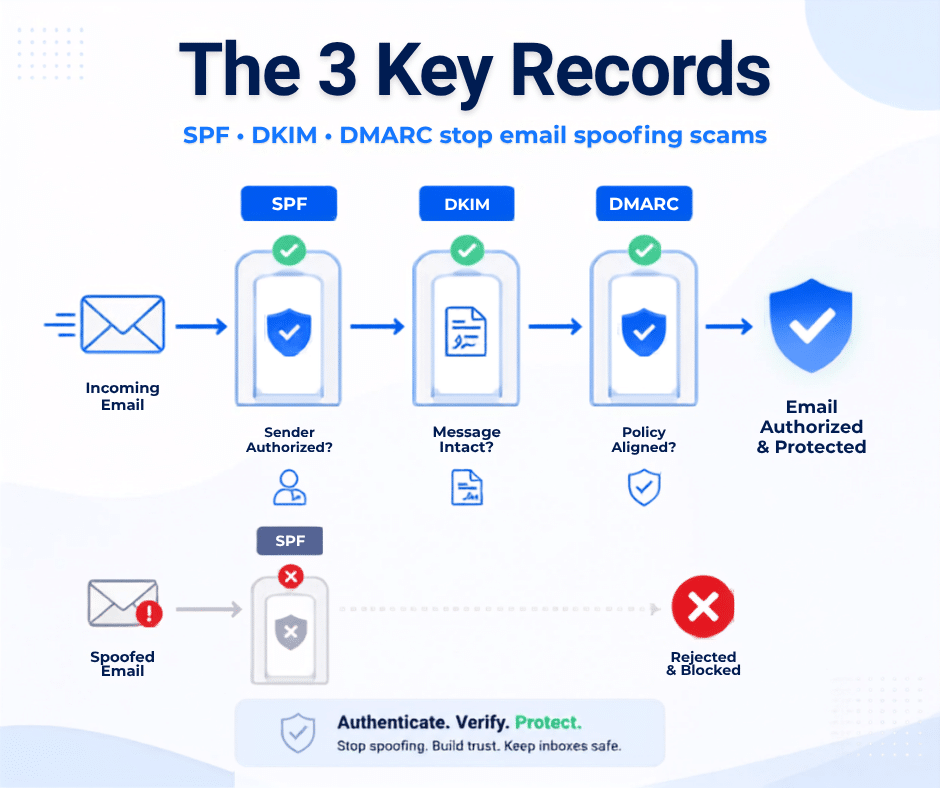
Think of them as a chain. SPF says which servers may send for you. DKIM signs each message so it cannot be altered in transit. DMARC tells the receiving mail server what to do when one of those checks fails, and sends you reports. BIMI is the reward at the end: your logo beside your name in the inbox. Break any link and the ones after it stop working.
SPF Record Analyzer: Who Is Allowed to Send as You
The SPF record analyzer inside the free domain scanner reads your published SPF record and counts the DNS lookups behind it. SPF has a hard limit of ten lookups, and once you have Microsoft 365, a marketing platform, an e-fax service, a practice management system and a billing vendor in one record, you are usually over it. When SPF breaks that way it fails silently — legitimate mail starts getting filtered and nobody knows why.
DKIM Validator Tool: Proof the Message Was Not Altered
DKIM adds a cryptographic signature to every message you send, and the receiving server checks it against a key published in your DNS. The DKIM validator tool inside the free domain scanner looks up the common selectors used by Microsoft 365, Google Workspace and the major sending platforms, and flags keys that are missing, too short, or left over from a vendor you stopped using two years ago.
Free DMARC Checker: The Policy That Ties It Together
DMARC is the instruction manual for everyone who receives your mail. The free DMARC checker reads your policy and tells you whether it is set to none, quarantine or reject, whether reports are being sent anywhere, and whether the policy actually aligns with the domain in your From address. Most New Jersey small businesses we scan are either missing DMARC entirely or sitting at p=none, which monitors spoofing without stopping it.
BIMI Record Lookup and Why Your Logo Is Missing
BIMI is the one record on this list your clients actually see. When it is in place, your logo appears next to your name in Gmail, Yahoo and Apple Mail instead of a grey circle with an initial in it. The BIMI record lookup in the free domain scanner tells you whether you have published one and whether your domain qualifies to use it.
Qualifying has prerequisites. BIMI only displays if your DMARC policy is at enforcement — quarantine or reject, never p=none — and if your logo is published as a square SVG Tiny PS file. Gmail also wants a certificate: a Verified Mark Certificate, which requires a registered trademark, or the newer Common Mark Certificate, which instead asks for proof that the logo has been publicly displayed on your own domain for at least twelve months.
That ordering is the point. A BIMI record lookup that comes back empty is rarely the real problem — it is a symptom of a DMARC policy that never reached enforcement. Fix the chain in order and the logo is the last step, not the first.
How to Read Your Free Domain Scanner Results
The score at the top is useful shorthand, but the findings underneath it are what matter. These are the issues we see most often when we run the free domain scanner across New Jersey small business domains, and what each one actually means for your mail.
| What the scan reports | What it means in practice | How urgent |
|---|---|---|
| No SPF record found | Any server on the internet can send mail as your domain and nothing contradicts it | Fix this week |
| SPF exceeds 10 DNS lookups | SPF fails for everyone, including your own legitimate mail — a common cause of sudden deliverability drops | Fix this week |
| SPF ends in ~all or +all | Soft fail or, worse, an open invitation; receivers are told not to take failures seriously | Fix this month |
| No DKIM signature found | Nothing proves your messages left your system unaltered; forwarded mail breaks constantly | Fix this week |
| DMARC missing | You get no reports, no policy, and no way to know who is impersonating you | Fix this week |
| DMARC at p=none | Spoofing is watched, not blocked — the most common finding of all | Move to enforcement |
| No RUA reporting address | Even your monitoring is off; nobody sees the daily reports receivers are willing to send | Fix this month |
| BIMI not published | No logo in the inbox, and usually a sign DMARC never reached enforcement | After enforcement |
Run the free domain scanner again after each change and watch the findings clear one by one. A perfect score is not the goal. A domain that cannot be convincingly impersonated is. If you want the results interpreted rather than just delivered, we do that as part of a security risk assessment.
Why Are My Emails Going to Spam?
This is the question that sends most people looking for a free domain scanner in the first place. Nothing changed on your end. You send the same invoices to the same clients you always have, and suddenly half of them say your messages never arrived.
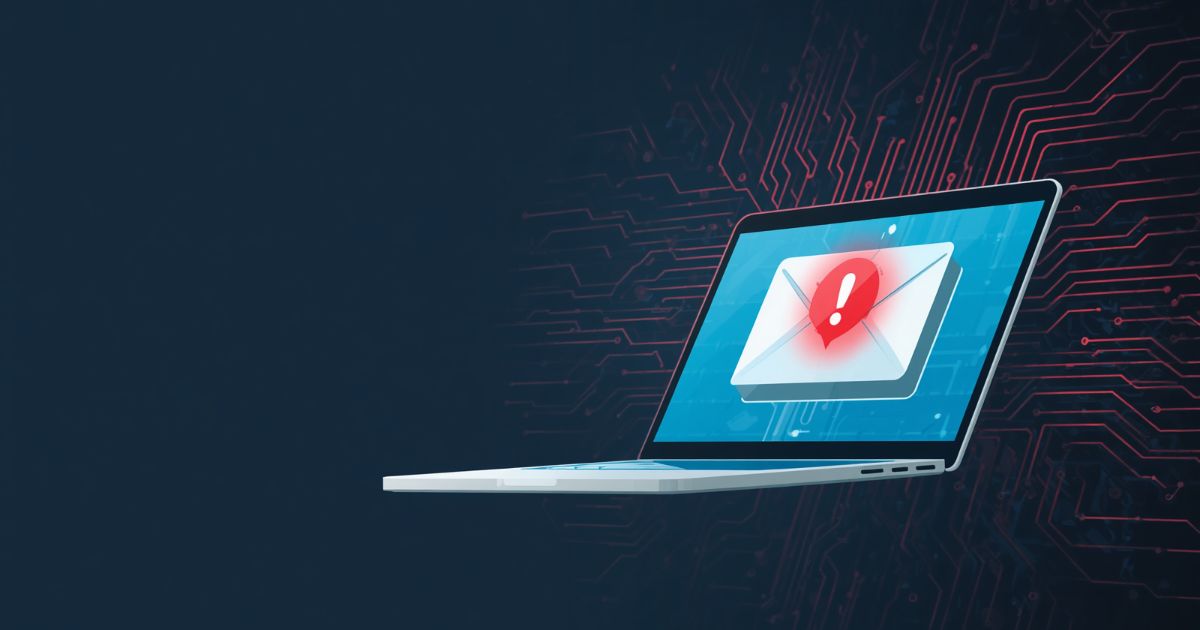
Usually one of four things happened. A vendor was added to your SPF record and pushed it past the ten-lookup limit. A DKIM key was rotated by a platform and never republished. Someone spoofed your domain in a phishing campaign and your reputation took the hit. Or the mailbox providers tightened their rules and your domain, which was never fully authenticated, finally fell below the line.
The free domain scanner separates those causes in about a minute. It does not guess at content or subject lines — it reads the DNS records that receiving servers read, and it reports the same failures they see.
Google, Yahoo and Microsoft Email Sender Requirements
The rules stopped being optional. Since February 2024, Google and Yahoo have required anyone sending roughly 5,000 or more messages a day to a Gmail or Yahoo address to publish SPF and DKIM, have a DMARC record on the sending domain, keep the From domain aligned with one of them, offer one-click unsubscribe on marketing mail, and hold spam complaints below 0.3 percent.
Microsoft followed on May 5, 2025 with the same core requirements for high-volume senders to Outlook.com, Hotmail and Live addresses: SPF, DKIM and DMARC at a minimum of p=none, aligned with the From domain. Non-compliant mail was first routed to junk, and Microsoft has said it will be rejected outright rather than filtered.
Most of the small practices that run our free domain scanner do not send 5,000 messages a day, so the letter of these rules may not apply to you. The spirit of them already does. The same authentication signals now decide how ordinary business mail is scored, and unauthenticated domains are steadily being treated worse. We wrote about the shift when it started in our post on why businesses need email authentication now.
You can confirm the current rules directly at Google’s email sender guidelines, then run the free domain scanner against your own domain to see where you stand.
Check SPF DKIM DMARC Online, Then Fix What You Find
Running the free domain scanner takes a minute. Acting on what it finds is the part that protects you. When we take a domain from unprotected to enforcement, it looks like this:
Week one — inventory. We start from the free domain scanner output, then find every system that sends mail as you: Microsoft 365, the EHR or practice management system, e-fax, payroll, the newsletter tool, the scanner in the copy room. Almost every client is surprised by at least one.
Weeks two and three — monitor. DMARC goes in at p=none with reporting turned on. The daily reports tell us who is sending as you, what passes, what fails, and what is actually being spoofed.
Weeks four to six — enforce. SPF is consolidated under the lookup limit, DKIM is signed for every legitimate sender, and the policy is moved to quarantine and then reject, in steps, watching the reports the whole way.
Ongoing — monitor and maintain. We re-run the free domain scanner on a schedule, because new vendors appear, keys rotate, and a record that was correct in March fails in September. That is why we treat this as a program rather than a project.
Free Domain Scanner Results by Industry
Every domain gets the same four checks, but what a failure costs you depends entirely on what sits in your mailbox. These are the four New Jersey verticals we work with most, and what the free domain scanner tends to find in each.
HIPAA Compliant Email Security Check for NJ Medical Practices
HIPAA does not name DMARC anywhere. What it does require is a risk analysis that considers threats to electronic protected health information, and email impersonation is one of the most obvious threats a practice faces. A HIPAA compliant email security check starts with the same question an auditor asks: can someone send a message that appears to come from your practice, to your patients or your billing company?
The free domain scanner findings we see in medical practices are consistent — an EHR that sends patient reminders from your domain without DKIM, a billing service added to SPF years ago and never removed, and no DMARC reporting at all. We handle this work as part of HIPAA compliance consulting and ongoing healthcare IT support in NJ.
CPA Firm Email Security Audit and FTC Safeguards Rule Email Compliance
Accounting firms are held to the FTC Safeguards Rule, which requires a written information security program with named safeguards, and the IRS reinforces it through Publication 4557 and the WISP guidance in Publication 5708. Neither document lists DMARC by name, but both require you to protect client data and control access — and during tax season a spoofed email asking a client to “confirm the wire instructions” is the attack that actually happens.
A CPA firm email security audit that begins with the free domain scanner is the cheapest control you will implement all year, and the free domain scanner report gives your written program something concrete to point at. Pair it with your WISP and your FTC Safeguards Rule compliance work, and see our page for accounting professionals and CPAs.
Law Firm Email Spoofing Checker for NJ Practices
Real estate closings made law firms a target. A criminal watches a matter progress, waits for the day funds move, and sends wire instructions from a domain that looks close enough to yours — or, if your records allow it, from your domain exactly. A law firm email spoofing checker — which is what the free domain scanner is, in that context — answers the narrow question of whether the second version is possible today.
New Jersey attorneys also carry confidentiality duties under RPC 1.6 and increasingly face client security questionnaires and cyber-insurance applications that ask directly about email authentication. More on that on our page for IT support for law firms in NJ.
Domain Security Checker for Financial Advisors and RIAs
Advisors, RIAs and lenders answer to the Gramm-Leach-Bliley Act, the SEC’s Regulation S-P amendments with their 30-day client notification requirement, and FINRA guidance on client communications. A domain security checker that shows a p=none policy is a finding an examiner can read in thirty seconds, and the free domain scanner puts it in front of you first, and it is one of the easier ones to close before your next review.
We cover this in depth on our financial services IT support page and for wealth management firms.
What a Free Email Security Scanner Cannot Tell You
We would rather be honest about the limits of the free domain scanner than oversell it. A free email security scanner reads public DNS. That is genuinely useful, and it is not the whole picture.
The free domain scanner cannot see inside your tenant. It does not know whether multi-factor authentication is enforced on every mailbox, whether a forwarding rule is quietly copying your invoices to an outside address, whether legacy authentication is still enabled, or whether your staff would click a well-written phishing message on a Tuesday afternoon. It cannot tell you that the attack came through a compromised vendor mailbox rather than a spoofed one, which is how most business email compromise actually starts.
No free domain scanner catches any of that. The FBI’s Internet Crime Complaint Center recorded roughly $3.04 billion in business email compromise losses in 2025 alone. Authentication records close one door. The rest of the house still needs locks — which is the difference between a DNS health checker tool and a managed security program.
A DNS Health Checker Tool Is a Starting Point, Not a Program
Treat it the way we do: the free domain scanner is triage. It tells you which door is open. A DNS health checker tool cannot tell you who already walked through one, which is the question a real assessment answers.
If you want the full view, that is what a cybersecurity assessment covers, and you can read the current threat advisories for our state at the New Jersey Cybersecurity and Communications Integration Cell or report an incident at IC3.gov.
New Jersey Email Security Compliance, Handled Locally
eMDTec has supported New Jersey businesses since 2002 from our office at 155 Pompton Ave in Verona, and we sit on the board of the North Essex Chamber of Commerce. For the firms who run our free domain scanner, New Jersey email security compliance is not an abstraction — it is the same handful of regulators our clients answer to every year, plus the New Jersey Data Privacy Act and the state’s breach notification statute sitting underneath all of it.
We work with practices and firms across Essex, Bergen, Morris, Union, Passaic and Hudson counties, from Verona and Montclair out to Paramus, Hackensack, Florham Park, Newark and the Princeton corridor. When a domain scan turns into a wire-fraud scare at four o’clock on a Friday, you get someone local who can be on site, not a ticket in a queue three time zones away.
Start with the Essex County page for local coverage, or see the full picture of managed IT services and which NJ regulations apply to your business.
Have an Engineer Review Your Scan Results
Run the free domain scanner, then send us the score. We will tell you in fifteen minutes what is actually at risk, what to fix first, and what it takes to get your domain to enforcement — whether you hire us or not.
Frequently Asked Questions About the Free Domain Scanner
Is the free domain scanner really free?
Yes. The free domain scanner is free to use on as many domains as you like, as often as you like. It reads public DNS records, so there is nothing to install and no credentials to hand over. We put it here because a domain that can be spoofed is a problem we would rather you find on your own terms than during a wire transfer.
How do I know if my domain is spoofed?
Without DMARC reporting, you usually find out when a client calls about a message you never sent. With reporting turned on, you see it in the daily reports: sending sources that are not yours, failing authentication, aimed at your contacts. The free domain scanner shows you whether that reporting address exists, which is why the first thing we do on any domain is publish a DMARC record with one, even before touching the policy.
Do I need DMARC if I use Microsoft 365 or Google Workspace?
Yes. Both platforms handle SPF and DKIM for mail you send through them, and neither publishes a DMARC policy for you. Without that policy, a receiving server that sees a forged message from your domain has no instruction and will usually deliver it anyway.
What DMARC policy should a small business start with?
Start at p=none with reporting, so you can see every system sending as you before you block anything. Move to p=quarantine once the reports are clean, then to p=reject. Skipping straight to reject is the fastest way to stop your own appointment reminders and invoices from arriving.
Will moving to p=reject break my email?
Not if you inventory first. Mail breaks when a legitimate sender was never authenticated — the fax service, the survey tool, the practice management system. That is exactly what the monitoring phase exists to find, which is why we spend two to three weeks reading reports before changing the policy.
How do I add my business logo to Gmail?
Through BIMI, and only after DMARC is at quarantine or reject. You publish a square SVG Tiny PS version of your logo, add a BIMI record to DNS, and for Gmail obtain a Verified Mark Certificate, which requires a registered trademark, or a Common Mark Certificate, which requires proof the logo has been on your website for at least a year. Run the free domain scanner first and check the BIMI record lookup section to see whether your domain qualifies yet.
What are the Google and Yahoo email sender requirements for 2026?
SPF and DKIM on your sending domain, a DMARC record aligned with your From address, one-click unsubscribe on bulk marketing mail, and spam complaints kept well under 0.3 percent. Microsoft enforces the same essentials for high-volume senders to Outlook.com, Hotmail and Live. The thresholds target bulk senders, but the signals are now used to score ordinary business mail too.
Does HIPAA require SPF, DKIM and DMARC?
Not by name. The Security Rule requires a risk analysis and reasonable safeguards, and email impersonation is a risk any practice can identify. Auditors increasingly ask how you prevent someone from sending as your practice, and “we publish DMARC at enforcement” is a far better answer than a policy document. eMDTec is not a law firm, and nothing here is legal advice.
How long does it take to fix SPF, DKIM and DMARC?
Clearing every finding the free domain scanner reports takes an afternoon for the records themselves. Getting safely to enforcement takes four to six weeks for a typical small practice, because the monitoring period is what keeps legitimate mail flowing. Domains with many sending vendors take longer.
Can you just do this for us?
Yes. Email authentication is included in our managed services and can be handled as a standalone project if you already have an IT provider. Run the free domain scanner, then book a call and we will start from your results.
A Free Domain Scanner Backed by Engineers, Not a Signup Form
eMDTec has been securing email for New Jersey healthcare practices, law firms, accounting firms and financial advisors since 2002. The free domain scanner is free and honest. If it turns up something serious, you will get a straight answer about what it means and what it costs to fix.
Talk to an Engineer

Start a Conversation and Learn How Technology Can Transform Your Business
Reach out today to schedule a meeting where we'll learn about your business and create an IT action plan that works for you.
Schedule Your Free Consultation Call (973) 295-5570